Best Practices of Email Personalization
Email personalization is a marketing strategy that tailors email content to individual recipients using their data. This data may be related to basic demographic, purchase, and interaction data; interests and preferences; as well as technical information. Email personalization focuses on making each message appear relevant for the recipient, applicable to them, and, of course, personal in its approach. This is necessary so that subscribers do not feel like a part of some mass marketing campaign.
Why Personalize Emails?
Email marketing personalization brings a variety of benefits. It attracts attention because personalized emails stand out more easily in the inbox and have a higher open rate. It builds trust since it shows that the brand knows and respects its users. It increases sales and conversions as users are more likely to buy when they are offered products they really want. It increases ROI with more effective campaigns because they are sent to the right people at the right time.
How to Personalize Emails: 5 Tips That Work
Map Personalization to the Customer Journey
First impressions make a difference
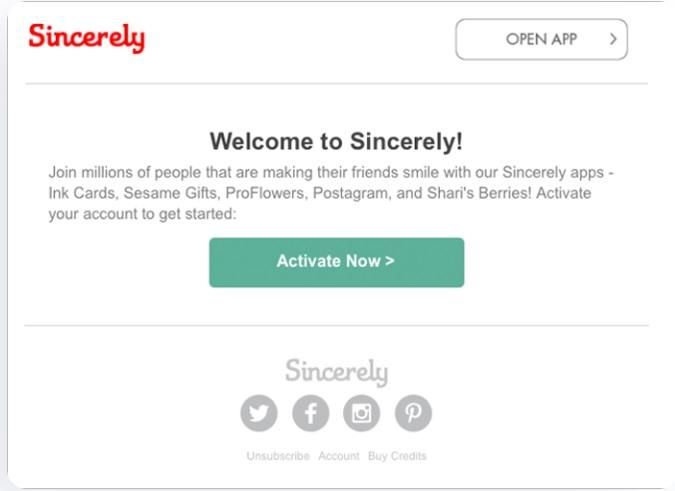
Activation triggers like app downloads or first-time sign-ups automatically send welcome emails at the right moment. Personalized welcome messages highlight the value of your brand and service, while suggested next steps guide users through their initial actions and help keep them committed.
Hey, you forgot something in your cart
Notice the abandonment stream. Sometimes, a user cancels the purchase and leaves their cart. In this situation, it is convenient to send them an email notification to encourage them to return. Such reminders should show the contents of the shopping cart, alert the user to any related discounts, and clearly explain how to complete the action. Timely and relevant emails often manage to recover lost sales.
Thanks for your purchase = Here’s something new for you
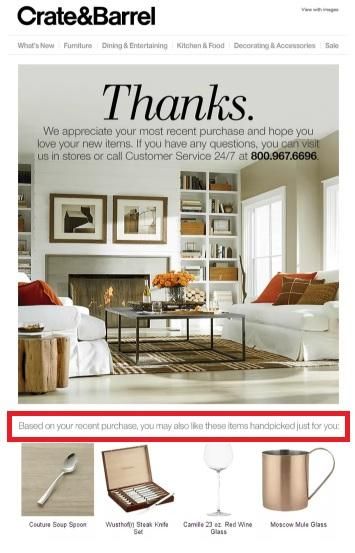
Post-purchase emails are equally important. They should offer additional products related to the previous purchase. Those kinds of messages also provide educational content on how to use the product. These actions increase consumer trust, lead to repurchases, and lower the complaint count.
Rebuilding trust, not subscriptions
Personalized emails should remind users with subscriptions or licenses about renewals. The messaging can be product-focused, explaining its worth and the return on investment. Talking to customers in this manner makes them feel like they are advised to purchase instead of being pressured to do so.
Wake up the sleeping beauties
Try personalized emails to re-engage inactive users through special promotional offers, educational information, and motivating experiences. Consider offering users a discount or gift. The goal is to show the clients that you still understand them and want them back.
Spotlight on the loyalty
Personalized emails targeting loyal and VIP users will contain special benefits and exclusive events. These could be new products or birthday gifts. This way, the user feels that their loyalty is truly valued.
Professional tip:
Learn about Nexrender, a great tool for video automation with After Effects templates. This platform can help you make bulks of personalized videos, which can be later used in emails.
Choose What to Personalize
A fullback for the perfect message
One of the personalization tactics is using the tokens that allow the automatic insertion of a user's name, location, or plan into an email. If some data is not available, don't worry, fallback ensures that the message still looks professional. This way, communication with the client remains personal, without errors and contradictions in the text.

Conditional blocks: the right content at the right time
Conditional blocks help promote certain content only to users from a specific segment or based on their behavior. This depends on the stage of the user's arrangement - whether they are newly signed up or about to renew their subscription. This way, messages remain relevant and increase the chances of engagement.
Screenshot source:
Product recommendations – with a purpose
Product or content recommendations can be created manually, based on predefined rules, or predictively, using user data. The point is that each message provides relevant suggestions that increase the chance of interaction or purchase. This way, customized emails become a valuable and personalized experience, not just a promotional message.
Screenshot source:
The importance of localization
Localization involves changing one or more languages, currencies, measurement systems, and holidays for diverse users in different markets. A job well done in localization makes it easy and relevant across regions, allowing for a smooth transition for users belonging to different groups.

Timezone and send-time personalization: know when the user is active
The fact is that sending emails at the right time according to the user's time zone increases the chances of the message being opened and read. This really boosts the effectiveness of the campaign.

Screenshot source:
Real-time content - responds to user needs
A great way to personalize content is to display information such as product availability, price drops, or local stores at the moment the email is opened. This increases engagement, but also conversions because the user receives up-to-date information at the right time.
Accessibility and device optimization
The message should be readable by any user, whether it is on a laptop, tablet, or cell phone. Also, no matter whether they use light or dark mode. This conveys the message more efficiently and enhances the user experience.

Screenshot source:
Write a Subject Line That Feels 1:1
A subject line tells a user briefly what they are about to look at and read; therefore, it must be honest rather than gimmicky. For an intimate approach, use the recipient's name or other non-sensitive information, ask a question, or specify the contents of the email. For example, "Hey, question for you (name)", "Is this what you're looking for (name)", or "Based on your interests about (product)".
Several key techniques
The following techniques are great for personalization in email marketing.
- Interest-based hooks refer to grabbing attention using information relating to the interests of the user. The more the message relates to the user's personal preferences, the greater the chances of the user opening and responding to it.
- A call to action redeems the user with an immediate thought of a recent activity, such as a current review of a product or even a purchase of a related product.
- Underlining value emphasizes the outcome of the product. This way, you indicate what the customer gets by purchasing that product, not just its features.
- Urgency is a method that can motivate the user to act immediately. However, this must be done ethically and honestly. For example: “The offer is valid until the end of the day” is a valid message.
Automate Email Creation
Our recommendations for personalizing email campaigns primarily focus on Brevo and Mailerlite. Brevo provides a variety of email personalization tools, like dynamic elements, segmentation, and automated communication flow. It enables tracking of user behavior data regarding their past purchases, locations, and content interactions. Each message can then be personalized to the specific interests of the recipient. In this way, you will send only relevant and timely messages that foster trust in the recipient, rather than generic newsletters that are often left unopened.
Mailerlite crafts personalized email templates and designs messages according to the audience's requirements. It allows emails to be sent in multiple versions through tagging automation and segmentation based on a customer's status in sales and previous interactions. Such an approach makes each campaign a direct and authentic communication, like a dialogue between the brand and the individual.
Analyze and Scale
Performance monitoring of campaigns is one of the best practices in email personalization. Such metrics as open rates, clicks, and conversions prove what works and what needs adjusting, as well as identify things that should be put aside from the campaign altogether. Successful patterns could then be scaled up in terms of personalization: they can be automated and applied across wider audiences without losing the feel of authenticity and relevance.
Professional tip:
From automated rendering to data-driven personalization - Nexrender turns video content creation into a simple and effective marketing process.
Bonus tip: Personalization in B2B vs B2C
B2B account-based personalization
In a B2B environment, personalization is focused on specific firms and their roles within the buying committee. It is necessary to understand the needs and pain points of each decision maker to ensure the message is concise, strategic, and relevant to the entire team.
Firmographic and technographic signals
By considering the size, industry, technology stack, and intent signals of a company, messages can be crafted in a truly relevant way for the involved customer. Using this information in email campaigns makes your communication timely and informed.
One-to-one sales outreach
In sales emails, personalization is based on specific research and finding relevant input into the communication. Short references, or icebreakers, and a clear value proposition make the message personal and professionally focused.
Routing replies and handoffs between marketing and sales
Setting up a clear system for routing responses between marketing and sales should ensure a consistent experience for the recipient. When the flow of communication is unhindered, personalization takes on an environment conducive to collaboration over the long haul.