How to Turn Sports Data into Pre-Match Review Video - Cooking Receipt
Pre-match reviews have always been part of football.
Journalists wrote them mainly for big games. They’d highlight teams’ head-to-head stats, recent league performance, projected lineups, top scorers, injuries, suspensions, and some flavor text about the storyline of the match. Very often match reviews include referral links from betting companies.
Writing such content takes time, so they are written only for major matches.
Lower-tier leagues, mid-table fixtures, or niche competitions didn’t get any editorial attention — even though betting activity is huge there.
So we built a system that creates fully automated video pre-match reviews for any football match and other sports in the future.
It runs on autopilot, requires no manual editing, and can be embedded directly into sportsbook event pages so players can watch a 40–45 second preview before placing their bet.
We’ve built this solution together with
, top-tier supplier of high-quality sports data.
The Idea in One Line
Any match in any football league can now get a clean, professional pre-match video — generated automatically, instantly, and tailored for players. We’ve decided to focus on pre-match reviews for football, but the concept can be extended to other sports and cover individual bet results, league events and statistics, player performance reviews - you name it.
Why This Matters for Betting Operators
- Scalable — every match gets a preview, not just the big ones.
- Engaging — bettors watch a video instead of scanning text.
- Consistent — same quality for top leagues and small leagues.
- Dynamic — lineups, injuries, and stats refresh automatically.
- Zero manual effort — no editors, no designers, no copywriters.
This is how video automation becomes a real part of the sportsbook experience, not a marketing gimmick.
How Does It Work? (Receipt)
Prerequisites
In order to replicate this pipeline you will need:
- Nexrender account - you can your get trial here
Sportsdata.io account - you can get
- n8n account
- ChatGPT API
- 11Labs account
- Fal.AI account
Workflow
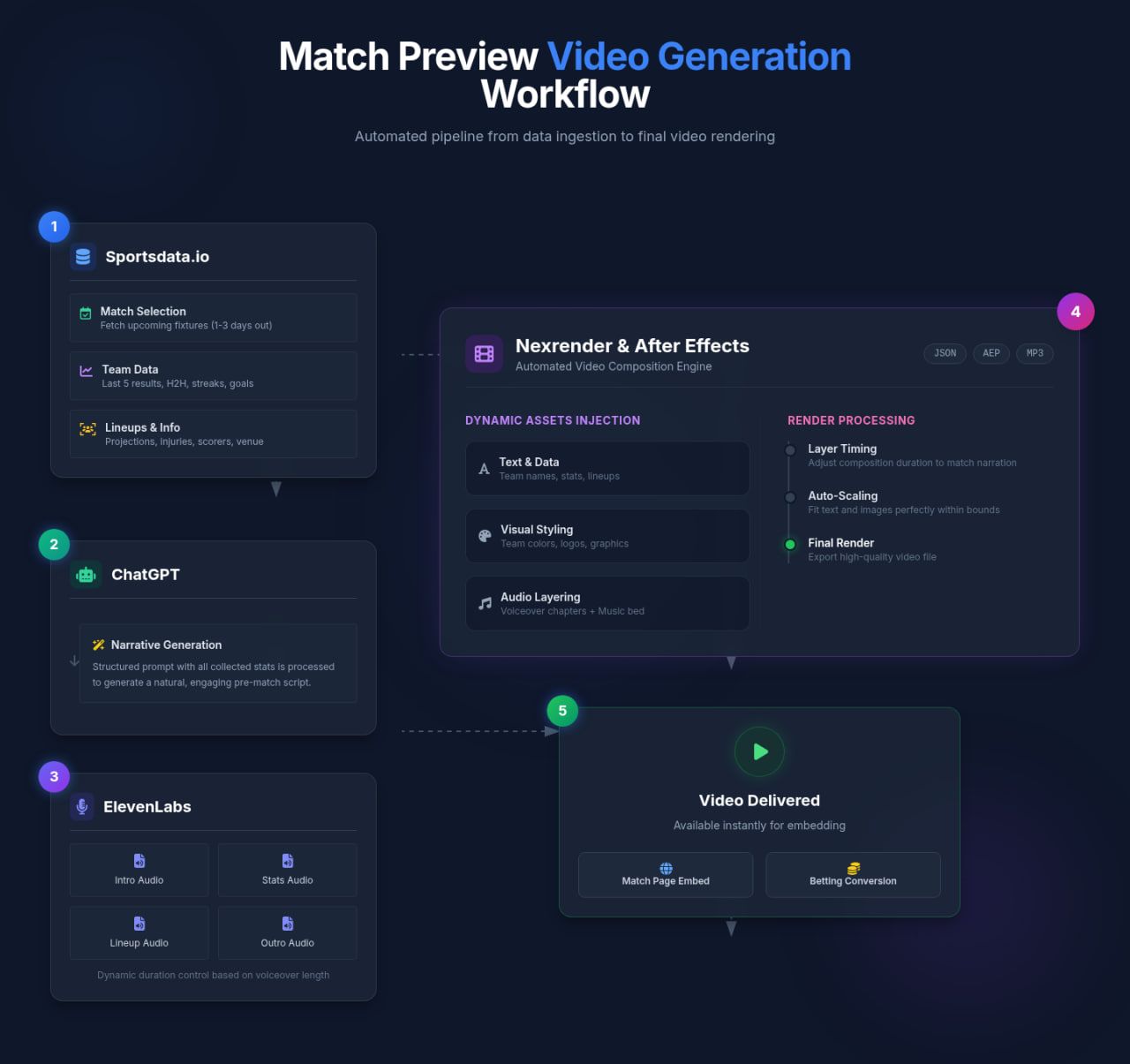
Picking the match
We pull upcoming fixtures for a given league or competition from Sportsdata.io. Then we pick the nearest one— usually 1–3 days ahead — because that’s when injury reports, projected lineups, and other pre-match insights are more accurate.
Gathering all relevant team data
We fetch the last 5 match results, head-to-head history, goals scored/conceded, streaks, and any notable trends. This data in json forms the backbone of the narrative.
Getting projected lineups, absences, and top scorers
From Sportsdata.io we pull:
- starting projections
- top scorers
- injured players
- suspended players
- venue and stadium info
- team colors and IDs
This ensures every preview feels specific and up to date. Also, this data helps to build dynamic prompt to build the narrative.
Building the narrative automatically
All collected stats are packed into a structured prompt and sent to ChatGPT, which generates a short, natural, engaging pre-match script.
Creating the voiceover
The script is split into sections (intro, form, head-to-head, lineups, etc.) and sent to ElevenLabs, which produces one MP3 per chapter.
This lets us dynamically control the duration of each part of the video, based on how long the voiceover is.
Forming the timeline and rendering the video with Nexrender
Nexrender takes the After Effects template and customizes relevant layers with:
- team names, logos, colors
- graphics and infographics, including AI-generated
- chapter-based layer timing
- voiceover
- music
Every section of the video is customized according to the narration voiceover file and its duration. The AE template uses dynamic layers (Text, Images, Colors) so the system can inject content without opening AE manually.
Generating safe creative assets with Fal.AI
To avoid copyright issues with team and league assets, Nexrender uses Fal.ai during render to produce the stylized versions of:
- team logos
- player headshots
- match cards
- background textures
Everything is consistent in style and safe for commercial use.
Delivering the final video
The render finishes and the video is available instantly. Operators can embed it directly on the match page. Players can watch it on demand, get informed quickly, and place their bets with more confidence. Such videos are created to increase bet conversion rates and improve user engagement.
The Motion Design Side: What Designers Need to Know
We also built a Pre-Match Motion Package so that After Effects templates work seamlessly with this automation pipeline.
Here’s the simplified breakdown.
Adapting mobile and desktop layout
Motion designers deliver two versions in a single AE project:
- Final_Desktop (1920×1080, 30 fps)
- Final_Mobile (1080×1920 vertical, 30 fps)
Both must contain the same dynamic layer names, so the automation can target them reliably in any format.
Dynamic layers exposed in Essential Graphics
Text layers:
- var_teamname_1
- var_teamname_2
- var_match_date
- var_h2h_history
- var_last_5_games_team_1
- var_last_5_games_team_2
- var_top_scorer_team_1
- var_top_scorer_team_2
Image layers:
- var_teamlogo1_img
- var_teamlogo2_img
- var_bergamo_stadium_img
- var_head2head_img
- var_last_games_team1_img
- var_last_games_team2_img
- var_top_scorer_team1_img
- var_top_scorer_team2_img
- var_missing_players_img
Theme Colors:
- var_primary_color
- var_secondary_color
Templates must animate smoothly no matter what we inject — long names, short names, large numbers, short numbers, etc.
Audio-driven timing
Each video section gets one MP3 voiceover. The automation adds markers to the timeline:
- Section starts at a marker
- Graphics animate in ~6 frames after the marker
- Graphics animate out ~8 frames before the next marker
- Music ducks under voiceover automatically
We also use Nexrender Cloud Functions like nx-comp-duration-set to automatically adjust layer and composition lengths so the visuals match each voiceover segment. The scaling function dynamically scales text and images to fit the layout, preventing overlaps or broken designs when names or assets vary. This keeps every render clean without any manual resizing.
Layout rules
Desktop version uses side-by-side layouts; mobile version uses stacked layouts. Safe zones are defined so text doesn’t get covered by TikTok or Instagram UI overlays.
Infographic design guidelines
- Clean H2H card
- Last 5 games: W/D/L icons
- Projected lineups with jersey numbers
- Injury icons: “Out”, “Doubtful”
- Top scorers: stylized headshot + stats
These visuals are fed into the comp as transparent PNGs generated automatically.