How to Create Personalized Videos Using n8n, Nexrender and GenAI
In this article, you will learn how to generate fully automated personalized videos using low-coding platform n8n, Nexrender, and AI-based on a real demo pipeline that creates dynamic book review videos from a list of sci-fi novels.
This is a recipe-style guide. You can reuse the same workflow to build custom video, personalized birthday videos, or dynamic video ads.
What’s inside this recipe?
This pipeline was built to showcase two things:
- How to orchestrate video creation using n8n and Nexrender Nodes without coding skills
- How to leverage Nexrender GenAI functions to personalize content with AI
The demo generates a unique video review for one randomly selected sci-fi book out of a list of 50.
Prerequisites
To recreate this pipeline, you will need:
- Nexrender Trial - request the trial, accept the invite
account (cloud or self-hosted) - low-code automation software
(JSON) - you can import the whole pipeline to n8n - make sure to use your credentials in each pipeline step
- Active ChatGPT API account
- Fal.ai (AI video generation provider) - used for AI video generation
- use this After Effects project as a rendering template;
How does the custom video pipeline work?
At a high level, the workflow runs in six stages:
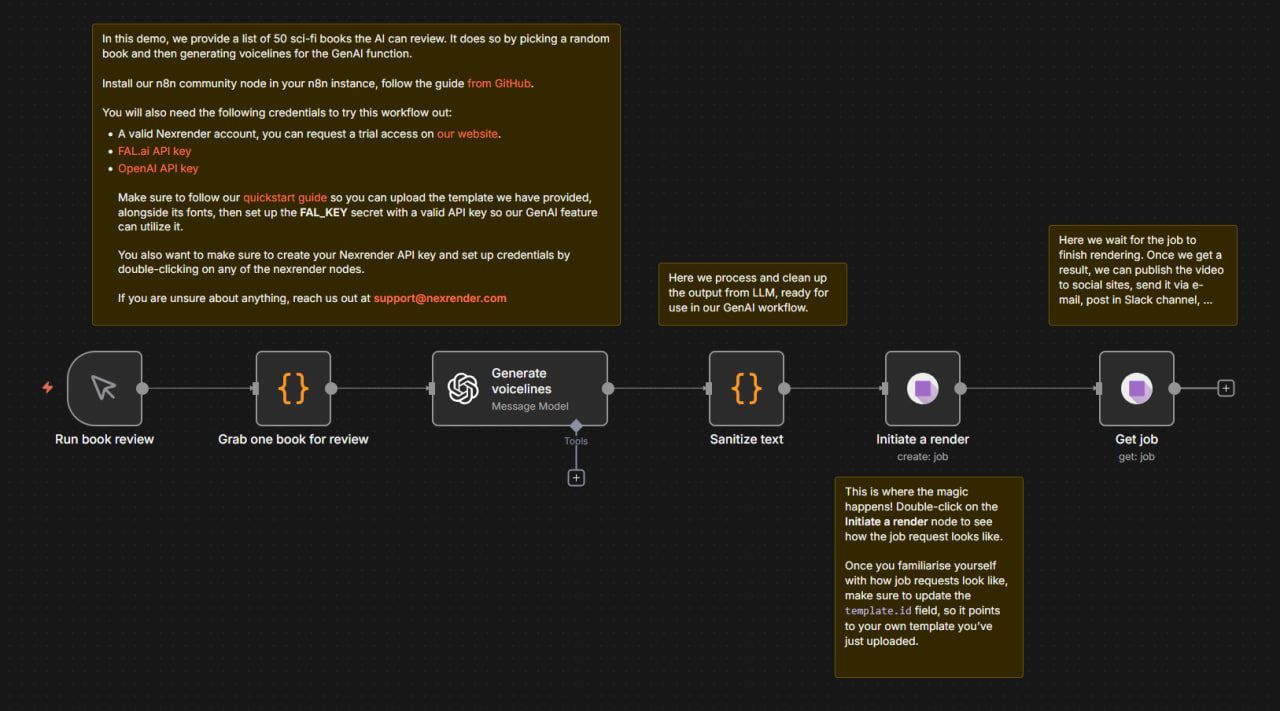
- Start the workflow manually
The pipeline is triggered to generate a new personalized video. - Pick one sci-fi book at random
One book is selected from a predefined list of 50 titles, each with an author and description. - Generate short AI voicelines
AI creates concise spoken content suitable for short-form video, summarizing and reviewing the selected book. - Clean and prepare the generated text
The AI output is processed so it can be safely reused inside a video workflow. - Create a personalized video job
The book title and author are injected into the video template, while AI generates matching footage dynamically. The video duration adapts automatically to the length of the review.
Wait for completion and deliver the result
Once the video is ready, you can publish it, share (don’t forget to tag Nexrender in this case :), or connect to any downstream automation.
Step 1: Prepare the Customization Data
Define a fixed content list
The pipeline starts with a predefined list of sci-fi books embedded directly into the workflow.
Each item in the list contains:
- Book title
- Author name
- Short description
Select one random item per run
Every time the workflow is launched:
- The list is shuffled
- One book is selected at random
- Only that book is passed to the next steps
Step 2: Generate voicelines with AI
Once a book is selected, the pipeline generates spoken content for the video.
ChatGPT receives:
- Book title
- Author name
- Short description
The prompt instructs the model to:
- Produce only voicelines, no narration or metadata
- Limit the output to a few sentences
- Cover the full story from start to end
- Avoid intro-style phrases
The result is a compact spoken script designed for short-form video. At this stage, the output exists only as text and is not yet suitable for direct use in video.
Step 3: Clean and prepare the AI output
Before the content is injected into the video pipeline, the text is processed.
This step:
- Normalizes line breaks
- Replaces unsupported characters
- Ensures the text can safely travel through the workflow
Step 4: Configure the video template
The pipeline uses a single After Effects project. The template contains:
- A lower-third for book title and author
- Background footage
- A small set of visual controls
- A dedicated layer reserved for AI-generated video
There are no duplicated compositions or per-book edits. All variation is driven by data. Fonts are defined once and included in the render request to ensure visual consistency.
Step 5: Create the personalized video job
At this stage, the pipeline assembles a complete video request.
The job:
- References the uploaded template and composition
- Injects the selected book title and author into text layers
- Applies a predefined visual style
- Triggers AI-powered video generation for the main footage
The AI-generated footage is created using the previously generated voice lines and placed directly into the video. This is the moment where static data becomes a personalized video.
Step 6: Generate video footage with AI
The pipeline requests AI-generated video content based on:
- The book’s description
- The spoken review generated earlier
- A predefined visual prompt
- Voice and quality parameters
The generated footage is automatically placed into the correct layer of the composition.
Step 7: Adjust video duration dynamically
Each book review has a different length.
To handle this, the pipeline:
- Reads the actual duration of the generated footage
- Updates the composition timing accordingly
This keeps the final video synchronized without hardcoded values. Use Nexrender time trimming function for it https://docs.nexrender.com/cloud/jobs/functions/nx-comp-duration-set.
Step 8: Render and wait for completion
Once the job is created, the pipeline waits until rendering finishes.
During this time:
- AI completes video generation
- The final composition is rendered
- The output becomes available for delivery
Execution time varies depending on AI provider load.
In the demo, the full run takes several minutes.
Share your results
Each run of the workflow produces:
- One unique book review video
- Personalized title and author text
- AI-generated spoken and visual content
- A fully rendered, ready-to-use video
The same workflow can be executed repeatedly to generate a new personalized video every time.