Best Content Marketing Automation Software
Automated content marketing tools diminish the need for manual work throughout the entire content lifecycle. In short, it helps generate ideas, draft, edit, distribute, and optimize content.
Automation drives consistency through straightforward workflow and reachable deadlines. It helps produce more content without jeopardizing the quality. It’s essential to recognize that automated content creation tools cannot replicate human creativity. When it comes to conveying a brand voice or addressing a consumer issue, human creativity, empathy, and emotional input can’t be synthesized.
Core Automation Tool Categories and Top Picks
Let’s take a look at some of the most notable categories and best content marketing automation options for each of them. For every category, we’ll compare two picks so you can make an informed decision and meet your needs.
Professional tip:
Nexrender provides seamless video content personalization. Send out brand messages, tailored according to the individual needs of each viewer.
Ideation, Research, and SEO Opportunities
Automated content marketing tools built for this category simplify workflow related to finding fresh ideas. You’ll get relevant topics based on audience interests, keywords, and the latest industry trends.
Ahrefs: Content Marketing Automation Software Built For SEO
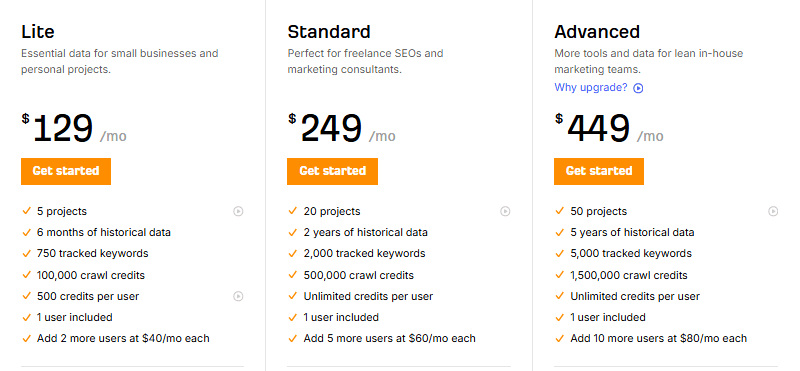
is a powerful tool, built to improve your SEO results. It handles content gaps by comparing your keywords with multiple competitors, providing you with a list of keywords that you should use for future content. Moreover, it features a SERP checker tool that helps analyze keyword rankings both locally and on a global scale. There are three types of plans available, each tailored for diverse user groups, with prices ranging from $129 to $449 per month.
SE Ranking: Affordable AI-Driven SEO Toolset
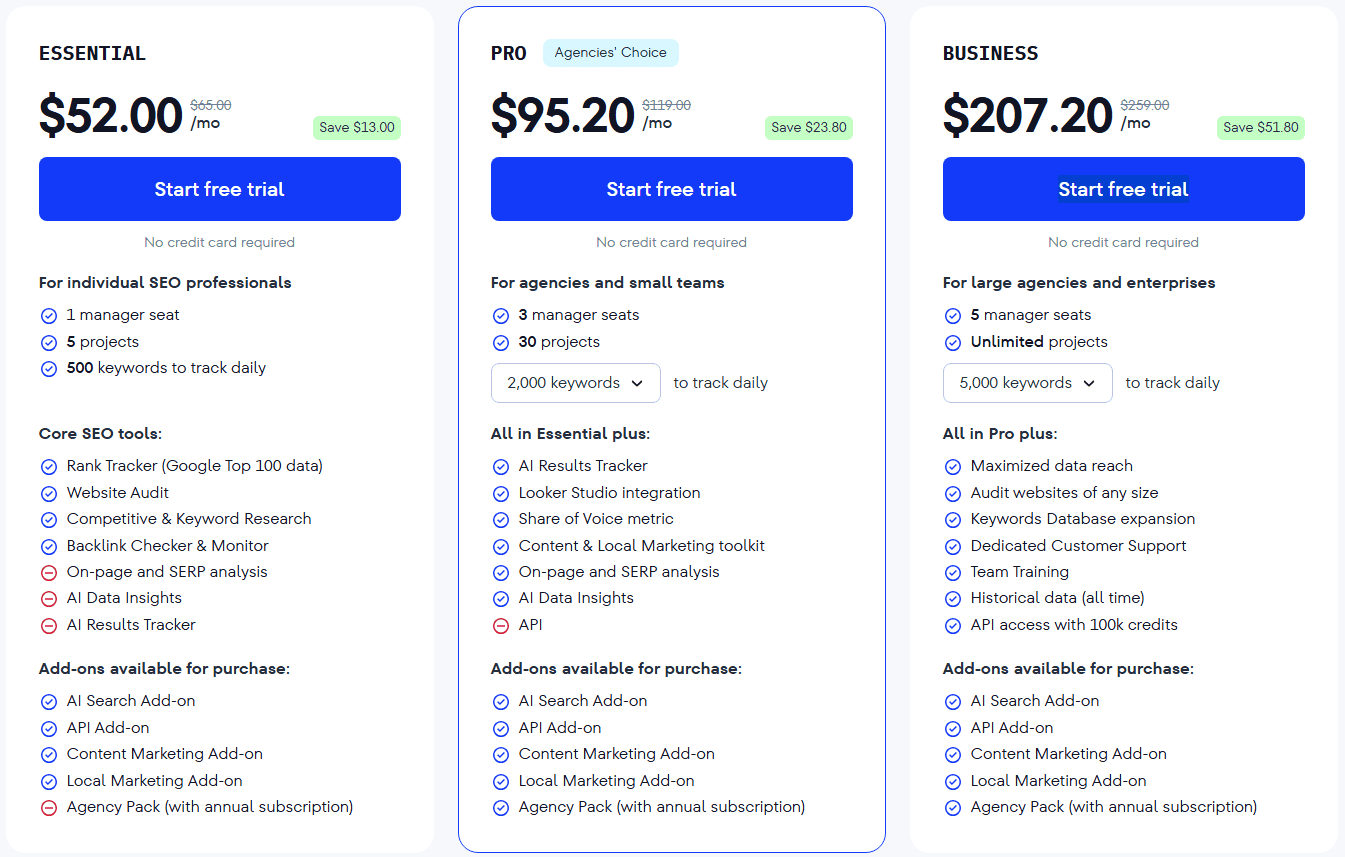
offers more affordable pricing, ranging from $52 for the essentials to $207 for the business plan. While SE Ranking's highest plan offers less value compared to Ahrefs’ lowest plan, it is a strong choice for those prioritizing budget and core keyword or SERP research. If comprehensive SEO features are critical for your workflow, Ahrefs remains a better fit, but SE Ranking is well-suited for cost-conscious users.
AI-Assisted Content Creation and Editing
AI technology now powers many content creation tools. Some, like Jasper, focus on marketers’ needs with templates and versatility, while others, like Writer, are designed for enterprise teams. Comparing Jasper and Writer, note Jasper’s focus on various content formats and templates for easy creation, whereas Writer emphasizes brand consistency and integration with business systems. Below, we compare how each supports content creation and editing.
Jasper: Versatile AI-powered Content Creation Automation Tool
Jasper is a powerful AI tool that generates everything from blog posts, landing pages, product descriptions, to emails. Do not confuse
with your everyday automated writing tool; this piece of software is designed for marketers. Thanks to pre-made content templates, you can seamlessly produce any type of content with just a few guidelines. It’s perfect for repetitive writing jobs, email campaigns, and overcoming writer’s blocks.
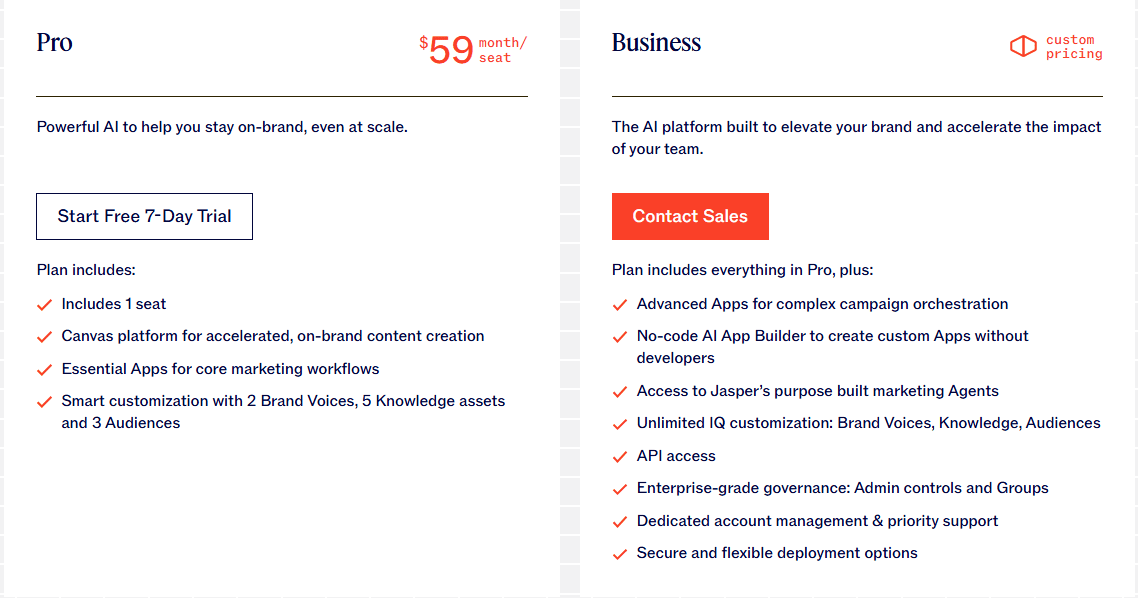
Jaspe is available in two options: there’s a pro version that goes for $59 a month and a business version with a price range that depends on which features you need to include.
Writer: Enterprise-Oriented AI Writing Tool
This tool is heavily oriented towards business users, allowing you to stay on brand while automating your content production process.
comes with a series of presets, called AI agents, that help build everything from blog posts to product detail copy. This tool integrates with your existing tools, databases, and other solutions to stay within your process and keep your brand voice consistent.
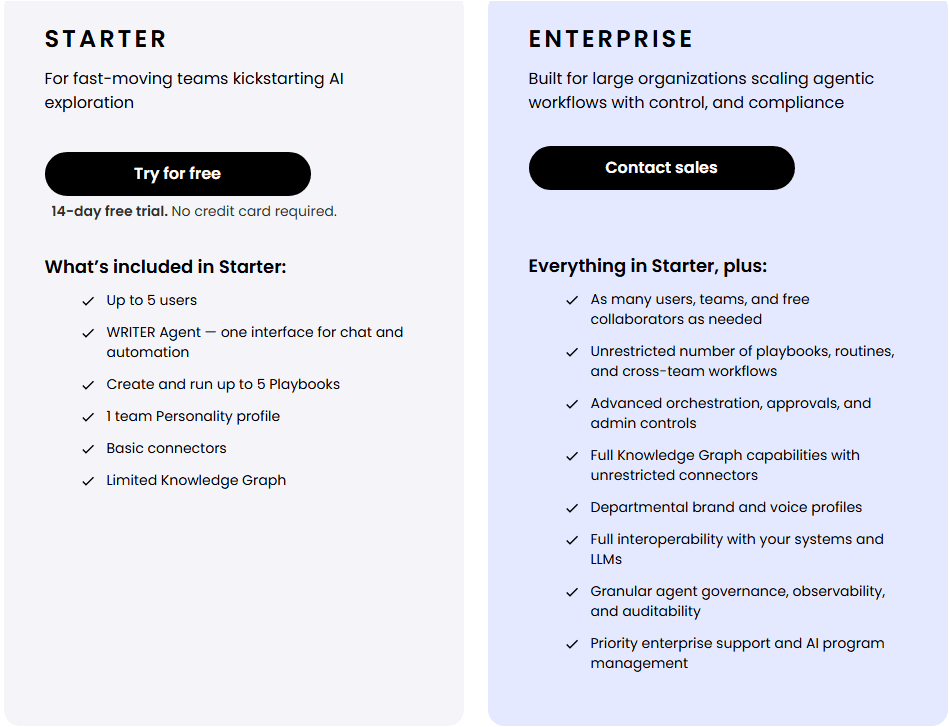
When it comes to pricing, you need to contact their sales team for that information, as there is no price indicated for either of the two available plans.
Professional tip:
With Nexrender, you can create personalized videos that hit the spot with a specific target audience. Use it when you need to improve audience engagement and trigger a specific response with your videos.
Repurposing Video/Audio Content
Within this category, we have a set of automation tools that allow you to turn your video or audio content into a series of short clips, transcripts, or some other form of content. This way, you can get the most out of each video you produce by sharing across diverse platforms. This helps keep an idea consistently conveyed across different networks. Repurposing cuts costs significantly while keeping your channels fed continuously. In this category, we compare After Effects to the Nexrender workflow.
After Effects: Content Editing Software That Bursts With Features
While it requires some technical knowledge, the benefits of
are plentiful. You can do anything from turning a video into a series of smaller clips or snapshots to polishing and redesigning content. It allows seamless template creation so you can stay on brand with each new graphic solution.
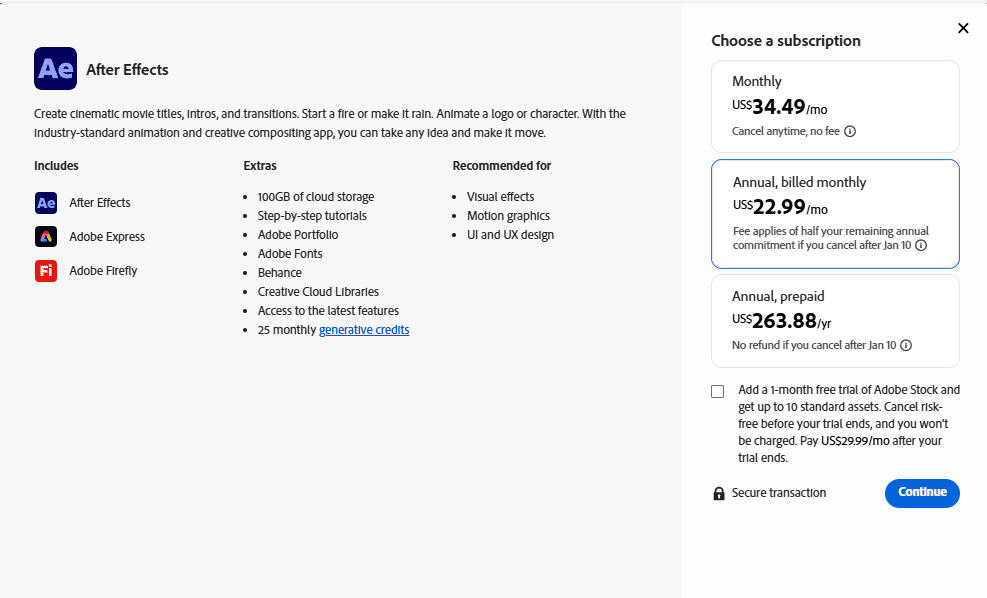
As for the price, After Effects is available for a monthly subscription, which starts at $22,99, with the price varying depending on the plan you choose.
Nexrender: Automate Your Video Repurposing Process With Ease
When After Effects is not enough or you simply wish to save time, Nexrender personalized video maker is the tool to choose. It allows you to edit any aspect of the video just the way you need it. The overall process is simple: just upload any After Effects file, add any custom fonts, pick the elements you wish to change, and wait for the magic to happen.
Repurposing your videos with Nexrender allows you to generate a series of personalized videos without spending extra time, manpower, or money. Your monthly subscription depends on what you need from this piece of software, so you pay only for those features that you intend to use.

Content Planning, Calendar, and Workflow
Automation tools from this category can protect you from missing a deadline or falling behind on your content production pace, so you can maintain brand visibility. In this category, we will review Airtable and Notion content management automation tools.
Airtable: More Than Just A Content Planner
Think of
as if it were a spreadsheet that saves you from repetitive typing, and you’ll be wrong. This AI-powered platform provides much more; it gives you control over the entire campaign. It facilitates coordination so each member of the team knows their job and views any changes in real time. This way, you don’t need to update your team whenever a change in a certain document occurs. Moreover, you can harness the power of AI to turn simple input into timelines and briefs that will generate an optimal strategy for your campaign.
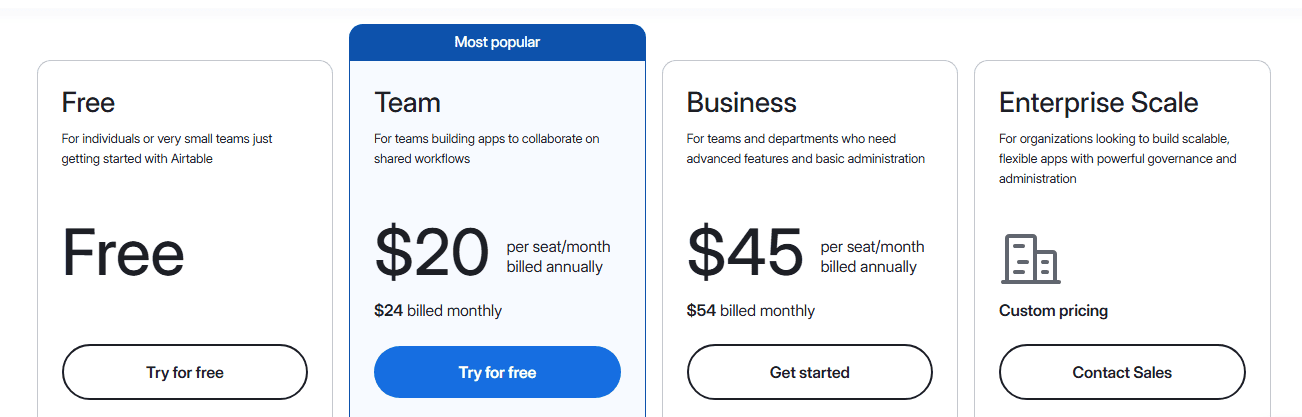
The price list for different Airtable plans starts with a free plan aimed at individuals who wish to learn more about this tool, to a custom Enterprise plan.
Notion: Automated Content Planning Tool And More
Based on AI technology,
provides a simple and efficient method of dealing with everyday planning activities. It allows you to generate tasks for the entire team through basic prompts. Imagine having an assistant who is so smart that you simply have to say what you need, and it will make it happen for you. It’s stunningly intuitive; the software goes through your messages, files, and online content to come up with personalized solutions.
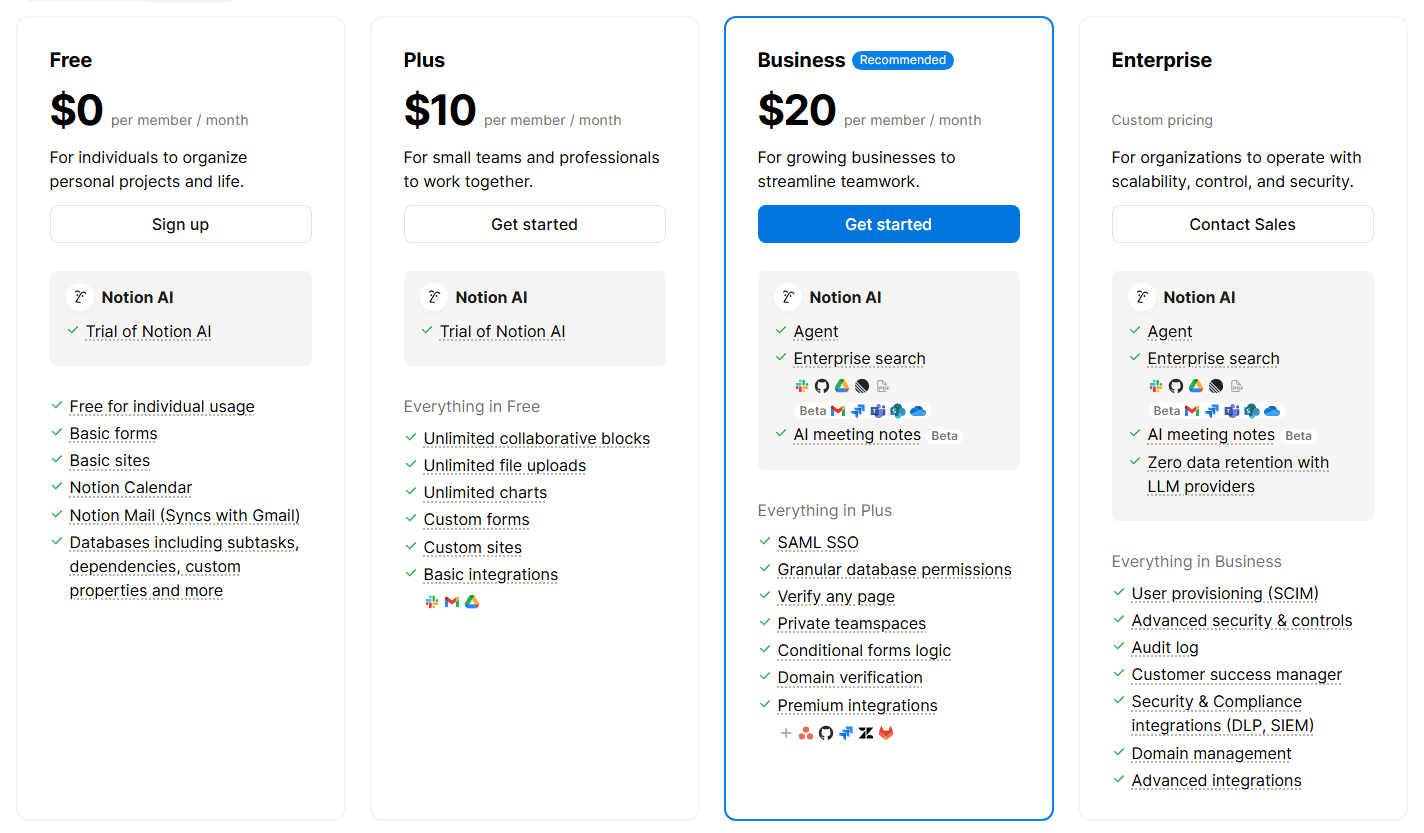
Thanks to a user-friendly dashboard, it’s easy to keep track of the workflow, create tasks, provide input, and cooperate with your team members. Price range includes a free plan for individuals and a custom pricing option for those among you who need enterprise-level service.
Social Media Scheduling and Repurposing
Consistent social media presence is imperative for brand awareness and lead generation. You wish to publish your post on time and reach the optimal audience, all the time managing your brand identity. For this reason, social media scheduling and repurposing tools stand out as some of the most important content automation services in the field.
Buffer: Easy-to-Use Social Media Tool
Buffer lets you keep all your social media accounts in check, at once. Besides scheduling the content manually, you can let the platform recommend the optimal time to publish based on in-depth online research. In addition,
utilizes AI to help you create and repurpose content for a wide range of social media platforms. Finally, you can keep track of each post and see how it works with the audience compared to your expectations.
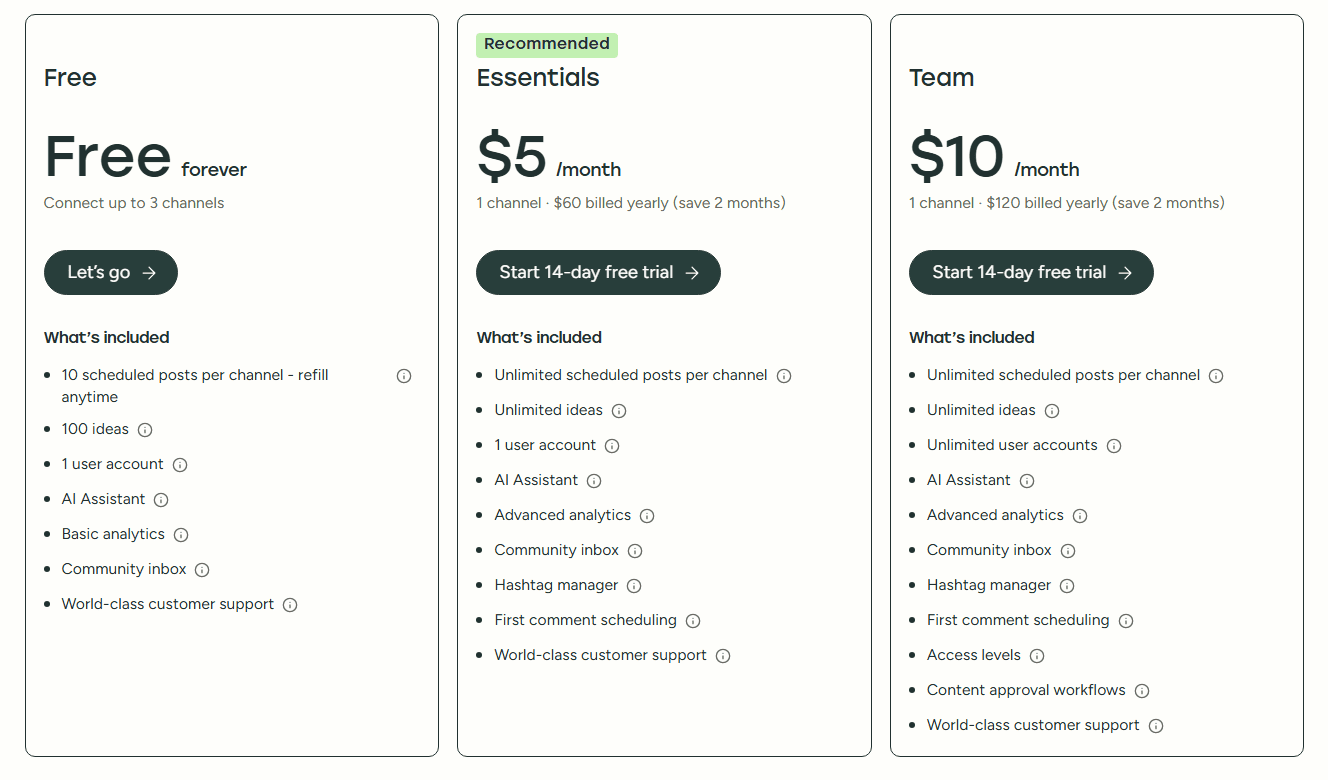
Buffer is an affordable tool, especially given the multitude of features and functionalities it provides. The pricing starts with a free plan, allowing you to connect up to 3 channels. The most valuable plan comes at a price that depends on the number of channels you require, with the lowest value set at $10.
Hootsuite: Keep Your Social Media Presence In Check Using AI
This software allows you to keep track of your digital footprint on social media through numerous AI-driven features.
gives insight into your brand as well as what the competition is doing. With information regarding the latest trends, you can plan your content and stay fresh. There are a series of metrics that help understand how different content performs and how your results compare to others. Instant DM replies will save time and keep the audience interested in your brand.
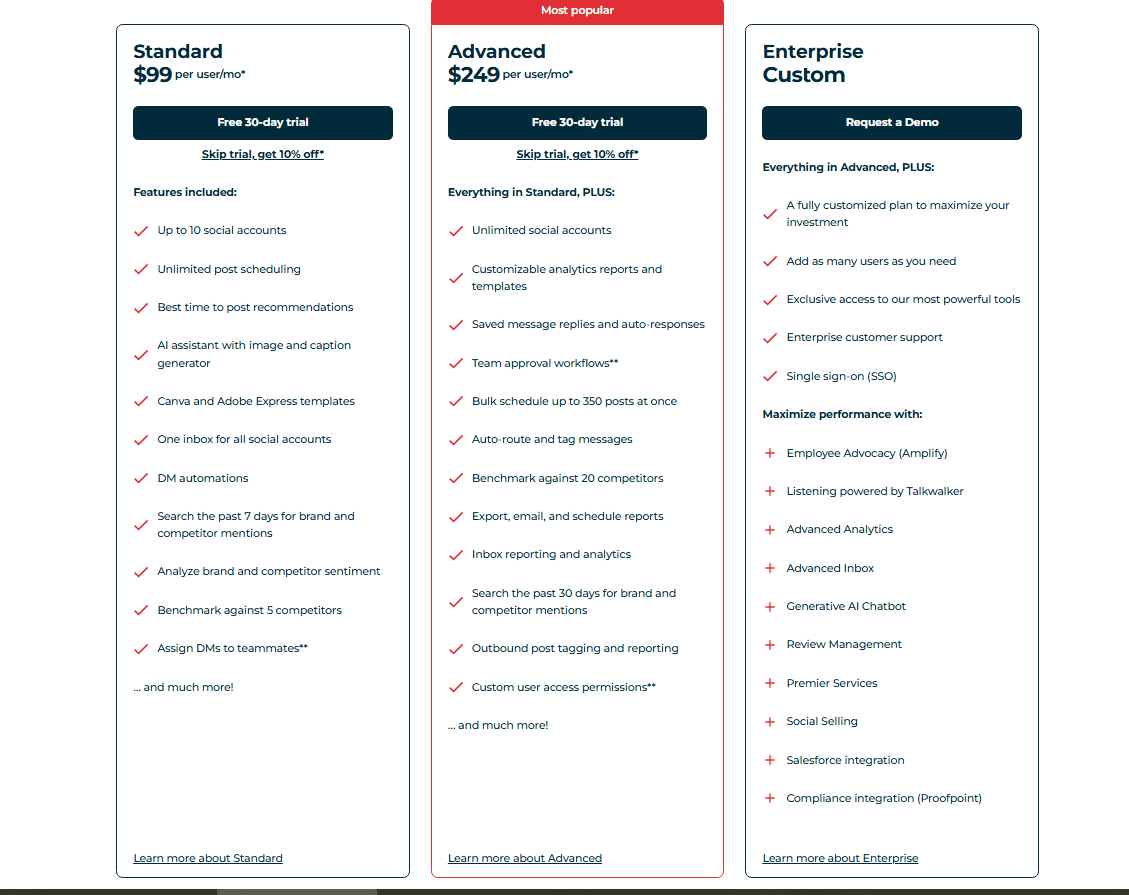
Moreover, Hootsuite will help you instantly create brief videos, graphics, and other types of content from your existing material. It’s the perfect way to keep the consistency of your online presence. There are three price plans for Hootsuite, starting with $99 per month for the standard package, to a custom price for enterprise users.
Email and Newsletter Automation for Content Distribution
Automating email and newsletter distribution cuts down your workload by a significant portion. Tools provided in this segment help you send out your emails and newsletters when the timing is optimal, without manual work, and to the most relevant audience. More than that, they provide automatic responses following your preset instructions and help with reusing existing content.
Mailchimp: All-Purpose Email Automation Tool
is a tool that offers numerous automation features. It keeps track of user browsing and purchase information to help create personalized email content. This app supports automated on-brand content production, targeting specific user groups based on their behavior. Performance analytics and customized reports complete the circle, giving you the opportunity to improve campaign outcomes.
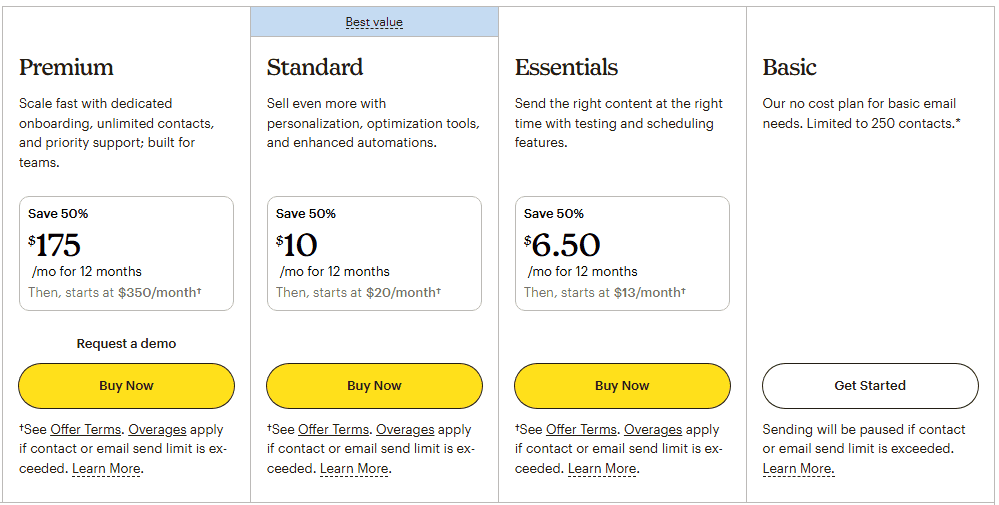
The pricing starts with a free plan aimed at individuals and basic users, while the most extensive plan comes with loads of goodies and costs around $175 per month.
ConvertKit: Text-Focused Automated Email Distribution
ConvertKit facilitates content distribution through a series of easy-to-use features. It automatically sends out newsletters to the optimal audience whenever you publish fresh content. Moreover, thanks to smart user segmentation, each topic will find the most suitable audience. ConvertKit segments users based on their behavior, and for the newcomers, it provides a set of your best content as a welcome. The best part is that all of these features work through a simple user interface that anyone can use.
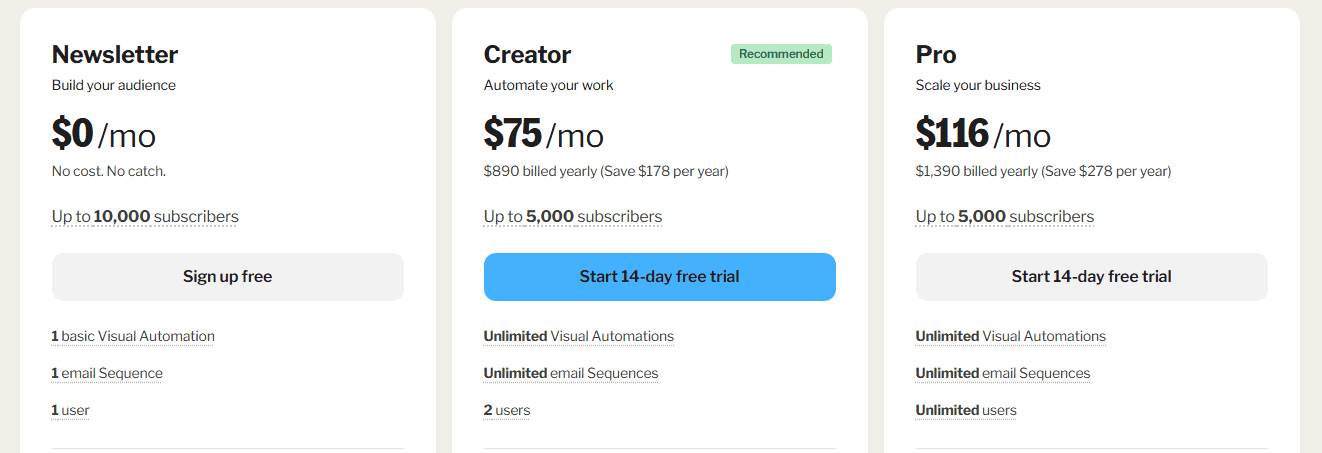
The pricing varies depending on the features covered by the plan, but the main influence is the number of email subscribers that you intend to service. Therefore, you can choose a basic, free plan or spend up to a few thousand dollars for a professional set of features.
FAQs
What parts of content should never be automated?
Never automate content that’s intended to spread brand voice, customer support, legal, or those parts of your content that should convey empathy. In a nutshell, avoid automating those parts of the content that specifically require human touch.
What are the best free options to start?
Many of these tools provide a free plan you can start with. You can choose Buffer for social media, Mailchimp to automate your email and newsletter distribution, and Airtable for automated content planning and scheduling.
Zapier vs Make: which to use and when?
Zapier is a simple automation tool, perfect for a novice. It offers simplified automation that connects all your apps and triggers specific actions. On the other hand, Make provides a more robust and complex user interface because it offers a wider range of features through which you can set up a multi-step workflow with great precision.
How to integrate with CRM and track attribution?
CRM integration and attribution tracking should be seamless. To do this, check which automation tools are compatible with your CRM. When it comes to tracking, you need to track every interaction and tie it to the individual user and source.
How to avoid spammy automation and protect brand voice?
The main piece of advice here is to avoid fully automating any process that comes to mind. Use automation to reduce repetitive tasks and cut down on work hours. When dealing with sensitive content or topics that convey brand voice, keep your process human-driven.