Does After Effects Have an API?
Imagine a team that needs to create 10,000 personalized video ads by tomorrow. No editor in the world can do it alone. Personalization means each video is tailored to different markets, languages, and distribution channels. At such a pace, manual editing and rendering are unthinkable, and the key lies in what video automation is and how it changes the entire production process.
Many in that situation start looking for the Adobe After Effects API as a starting point. APIs, scripts, and AI tools let the entire process, or maybe just portions of it, run without any real human go-between. Instead of an editor manually swapping the wording and rendering each variant one by one. The system kind of just does it: it pulls data from the database, drops it into the template, and then exports the file. That’s how you end up with a workflow that's quicker, more scalable, and less likely to sneak in the sort of errors that show up when the same chores get redone again and again.
Does After Effects actually have an API?
After Effects doesn't have a classic API. However, it does have something much more useful - an entire ecosystem of video automation tools that work together to do what a single API could never do. Scripts, templates, external data, and rendering pipelines - all of which can be connected into a system that generates video content on scale, without manual intervention.
What Video Automation Tools Do After Effects Have?
After Effects isn’t a classic video automation software, at least not in the REST API sense. But that doesn’t mean it's a closed ecosystem. Instead of one single API, it gives you three built-in ways to automate, and you can mix them depending on what you’re trying to accomplish.
- ExtendScript, a scripting language that directly steers After Effects, so you can open projects, adjust data, and nudge exports to run.
- Expressions, small pieces of code that live within the project itself and control animation in real time without the need for manual keyframes.
- Plugins, which add to the application’s capabilities and often have their own automation interfaces.
Each of these tools works at a different level, and together they can cover almost everything that a single API would otherwise handle.
How Do After Effects Scripts Work?
Scripts are the main programming interface in After Effects and the basis of any serious video automation. They are written in Adobe ExtendScript – an extended form of JavaScript – and saved as .jsx or .jsxbin files. They can be loaded manually through the menu, but also automatically when starting the application by placing them in the Scripts folder, or called directly from the command line through the aerender tool during headless rendering.
In particular, one script can:
- batch-fill text layers with data from CSV, JSON, or a direct database query
- replace footage and dynamic assets before the render even starts
- rename and reorganize layers and compositions
- build a ScriptUI panel that gives artists one-click access to complex operations
- automatically move the file, call an external API, or send a Slack notification after the render is complete.
Nexrender goes a step further by running custom .jsx scripts before each render, so templates can be changed automatically as part of the pipeline, even across thousands or millions of videos.
What Are After Effects Expressions and What Can They Automate?
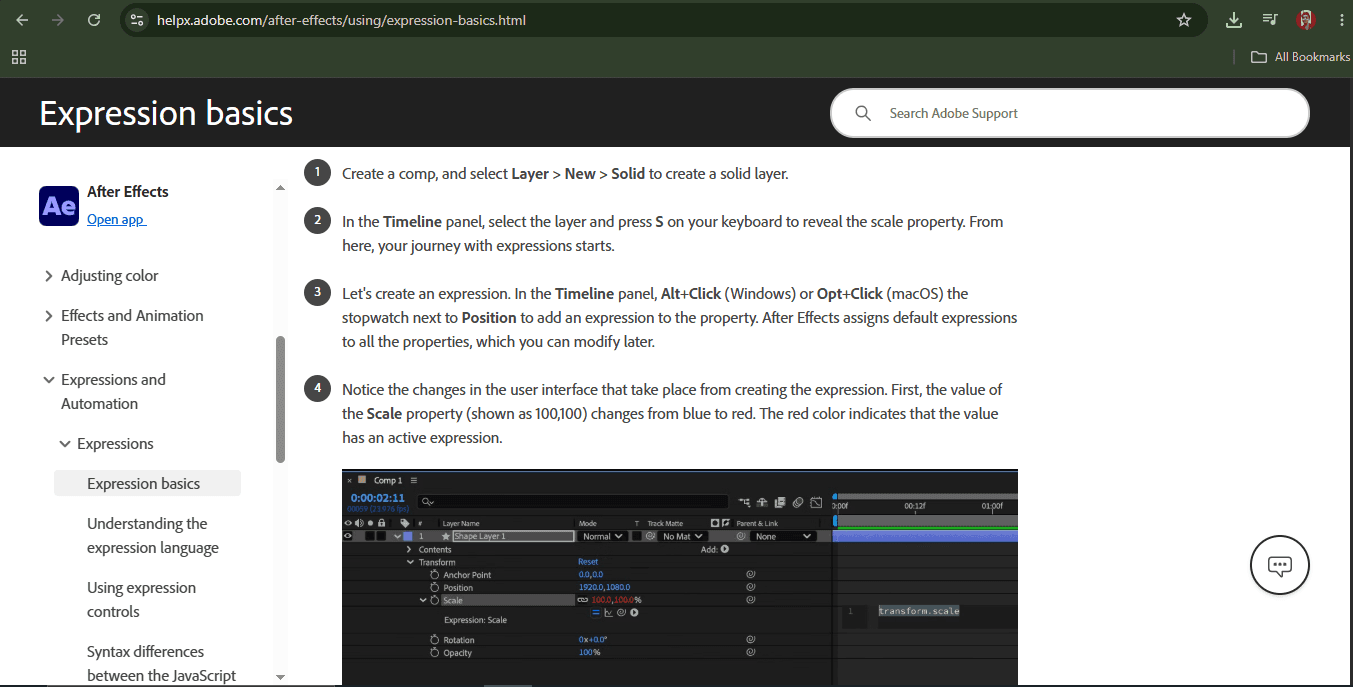
Expressions are JavaScript code snippets that apply directly to layer properties in the Timeline. That’s where the real automation magic happens! An expression doesn't tell After Effects to do something, but instead tells what a property is at each moment and then recalculates that value on each frame. That means animation is no longer just a bunch of keyframes you place manually, but rather a living mechanism that responds to whatever data you give it.
Expressions can control almost any property of an object that moves or can be animated: position, scale, transparency, rotation, color, and even what appears inside text layers. They also might pull values from other layers, so the whole workflow or the entire composition can feel sort of chained together, and you can end up controlling it all from one single point.
In practice, it looks like this:
- loopOut() creates an infinite loop from a short animation without any additional keyframes.
- wiggle() generates organic, random motion - like a camera shake or a soft bounce - again without keyframes.
- You can also link a text layer directly to a slider control or to external data inserted by a script.
- A graphic element like a title bar can vary in width depending on how long the text inside is.
- A time * speed formula can trigger continuous animation from a single value.
Keep in mind, expressions are the core of any scalable video workflow. A well-written template with expressions reduces the number of manual changes for each render job. It directly affects the speed and the reliability of the whole system.
Source: https://helpx.adobe.com/after-effects/using/expression-basics.html
What After Effects Plugins Are Relevant for Video Automation?
Plugins integrate with the After Effects renderer and effects pipeline at a deeper level than scripts do. In addition to extending the application's capabilities, they significantly affect the performance of the entire pipeline. From an automation perspective, three categories are particularly relevant.
- Data-driven workflow plugins, such as Motion Bro or Overlord, help artists batch-import and organize animation assets, thereby reducing the time required to manually set up templates before automation even begins.
- Visually intensive plugins such as Trapcode Particular or Element 3D. They can drastically slow down render times, which becomes a serious problem in an automated pipeline at scale. The recommended approach is to pre-render the layers that use these plugins before deploying the template to avoid that overhead on each render job.
- Export plugins, the most famous of which is Bodymovin, which exports compositions from After Effects as Lottie JSON files. This is a lightweight format suitable for web delivery. This effectively expands the list of output formats available in automated pipelines.
One important note for everyone building a pipeline is to take a look first before deploying. Always check if the plugins are compatible with the aerender tool and headless rendering on each render node. Not every plugin is built to work on a server without a display, and that mismatch can bring in errors that end up being really hard to diagnose once you’re in production.
How Does the aerender CLI Enable Headless Rendering?
Aerender is Adobe's command-line rendering tool, which comes with After Effects and allows the entire rendering process to be run without opening the application. It accepts arguments such as project path, composition name, output module, and export path - meaning it can be called from any language or system that can run a system command. This makes it the basis of every server-side and automated rendering workflow.
By itself, aerender is a low-level tool. It does one job and does it well, but it doesn't offer much more than that. No queue management, no job tracking, no data injection into the template. This is where Nexrender adds critical value: it wraps the aerender with a job-based architecture, injects .jsx scripts for dynamic template manipulation before each render, handles queues, shows progress in the dashboard, and delivers output to storage or the next pipeline step.
How Automated After Effects Workflows Work
- Every automated After Effects workflow starts with a well-designed template. A template is not an ordinary After Effects project. It is a structured foundation in which text layers, footage placeholders, and graphic elements are placed so that they can be changed programmatically. Expressions control how elements behave when data changes, and scripts define which values go where. Once created, the same template can be used for a thousand different versions of the video.
- The next step is to connect to external data sources. The template itself knows nothing about the content it is supposed to display. Data comes from outside - from CSV file, JSON response, database query, CRM or API. The script pulls them, parses them, and prepares them for injection into the project before rendering even starts.
- When the data is ready, the system populates the dynamic elements. Text layers get values from data, such as customer name, product name, price, and date. Footage placeholders are replaced with appropriate video or image assets. Graphics using expressions automatically adjust to new content, without a single manual click.
- After that, the render starts automatically. Aerender takes instructions - which project, which composition, which output format - and starts rendering without anyone having to open After Effects. In the pipeline used by Nexrender, jobs are submitted to a queue, assigned to render nodes, and tracked to completion.
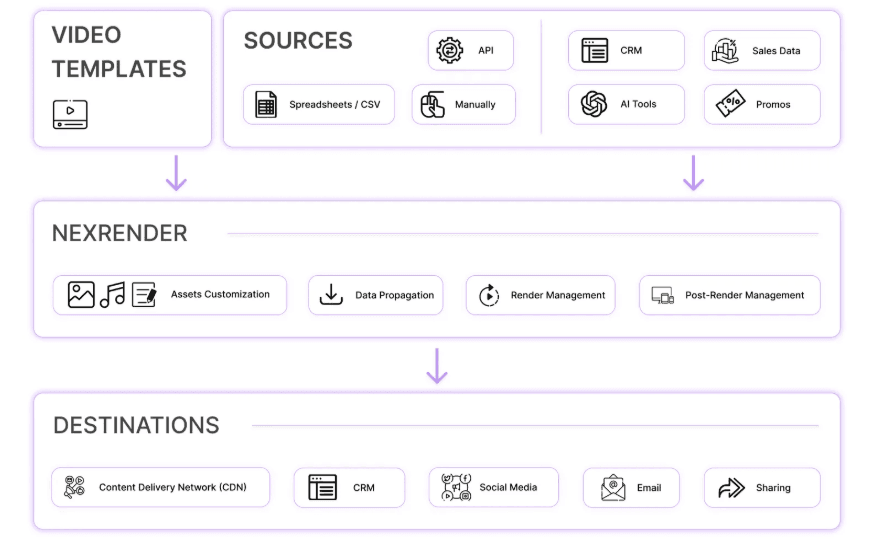
In the end, the finished video goes where it needs to go. Output is automatically delivered - to cloud storage, to the website, to CRM, to the marketing platform, or directly to the user. The entire process, from the data to the final file, takes place without human intervention.
This is how After Effects stops being a design tool and becomes part of a larger production system – machinery that receives data at one end and delivers finished video at the other.
How to Integrate After Effects With Business Applications
- CRM platforms like Salesforce or HubSpot can directly feed a video template with customer data – name, company, and stage in the sales cycle – and thus automatically generate personalized videos at the right moment.
- Marketing automation systems like Marketo or ActiveCampaign can run a render job as part of an automated flow, ensuring the video reaches the user exactly when and why they need it.
- E-commerce platforms have perhaps the strongest use case: each product in the catalog can get its own video with accurate data pulled directly from the product database, without a single manual step.
- Internal databases can be a direct source of data for the render pipeline, eliminating manual data extraction and input, and thus the possibility of human error.
- AI applications introduce a new level of dynamism – generated text, synthesized voiceover, or automatically selected images can go directly into the template before rendering.
- Content management systems allow a video to be automatically generated with each new published piece of content, which is especially useful for media houses that want a video version of every piece of text.
When the system itself pulls data, runs the render, and delivers the output, the entire process takes place without waiting for a human – faster, without the errors of manual input, and at a scale that is simply not possible by hand. API-based integration doesn't speed up the old way of working; it replaces it with a new one.
Summary
After Effects doesn't have a REST API, but that's not an obstacle to automation. It’s an invitation to think differently. By combining ExtendScript scripts, expressions, plugins, and aerender CLI tools, After Effects can be transformed from a manual editing tool into part of a fully automated production pipeline. When external data, CRM systems, databases, and AI applications are connected to it, you get a system that receives data at one end and delivers finished video at the other - without human intervention. Nexrender is the framework that holds all those pieces together.