How to Automate Video Creation with Zapier
What if you could automatically send a personalized video whenever a form is filled out on your site, a product is purchased, or a new lead is added to your CRM – all without anyone on your team having to open Adobe After Effects? It is automated video creation: a process in which video production is triggered and executed without human intervention based on predefined rules and templates.
The reason more and more brands, agencies, and marketing teams are switching to this approach is simple: sales personalization. Manually creating hundreds or thousands of video variations is simply not scalable. Instead of an editor manually changing the name, product, or number for each video individually, automation handles it in the background in real time, so your team can focus on strategy rather than rendering.
And that’s what makes Zapier integrations so great. Zapier connector video automation workflow integrates with thousands of business applications (CRM systems, forms, e-commerce platforms, spreadsheets) and allows you to automatically transfer actions from one application to another, without writing a single line of code. When that “trigger” is linked to a render engine like Nexrender, the whole chain is closed: the data goes in, the After Effects template gets filled and automatically rendered, and the finished video comes out of the other end fully automated.
How to automate video content creation with Zapier?
Automate the video creation by connecting a trigger (such as a completed form, a new lead in CRM) to a Zapier connector for video workflow video automation, which links to a rendering service (such as Nexrender), which then produces a personalized video according to an Adobe After Effects template. If we are to understand that the process consists of these two pieces, it’s worth explaining the functions of each.
In this story, Zapier is the “postman.” It watches your apps and, as soon as something happens (a new lead, a paid order, a filled row in Google Sheets), it passes that data on, exactly where it needs to go. Zapier is good at bridging gaps and sending things from one tool to another, but video processing isn’t what it’s designed for. Zapier doesn’t know how to open an After Effects file, insert text, an image, or a number in a composition, and export it as a finished MP4 file.
That's where you need a render engine that can automate Adobe After Effects itself. Also, that's exactly what Nexrender does. It receives the data Zapier passes to it, inserts it into the appropriate After Effects template (changing text, replacing images, updating numbers), and starts rendering without any manual intervention. In other words: Zapier says "something happened" and Nexrender says "here's the finished video".
The flow basically looks like this:
- Trigger (a new row in Sheets or form submitted)
- Zapier (catches the trigger and forwards the data)
- Nexrender API (receives the data and prepares the render)
- After Effects Template (data automatically inserted into composition)
- Rendered Video (link to a completed MP4 file)
- Email / Drive / S3-storage / CRM (video delivered automatically).
The process is completely automated: no manual prompting or monitoring by the team members is needed once you get started with this chain.
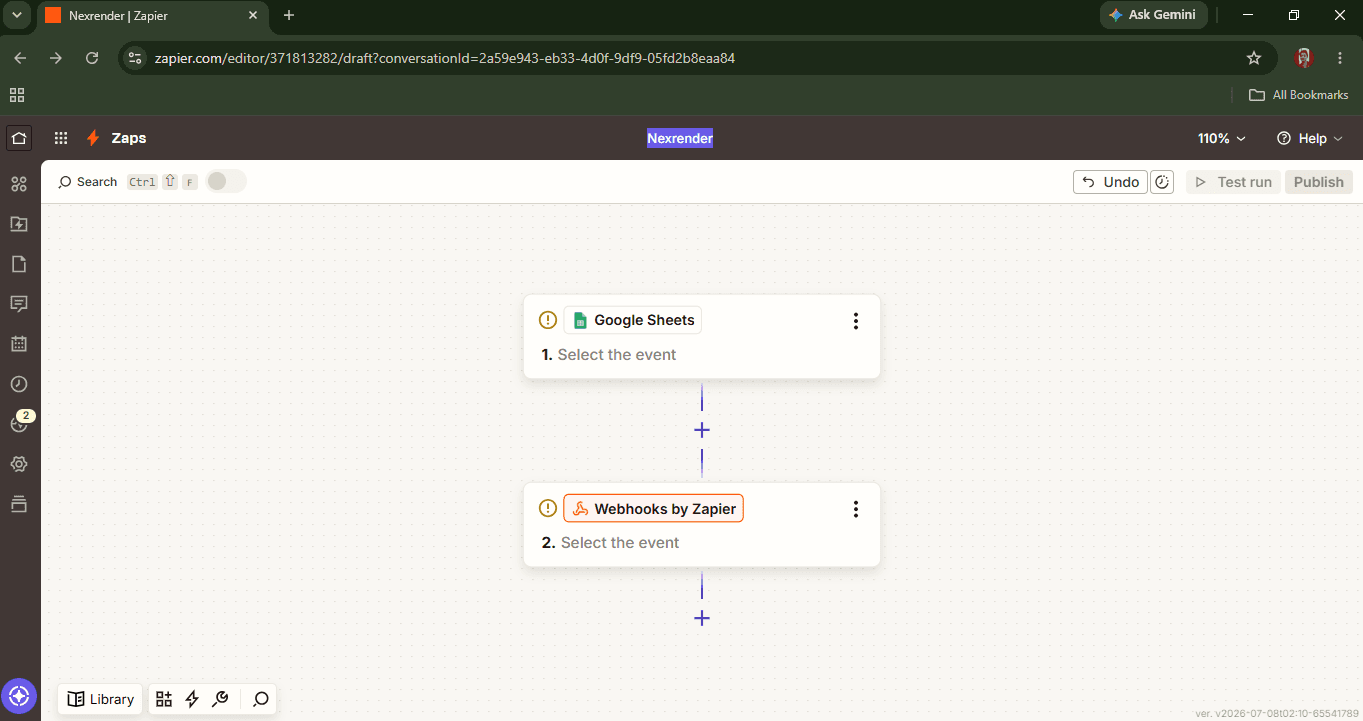
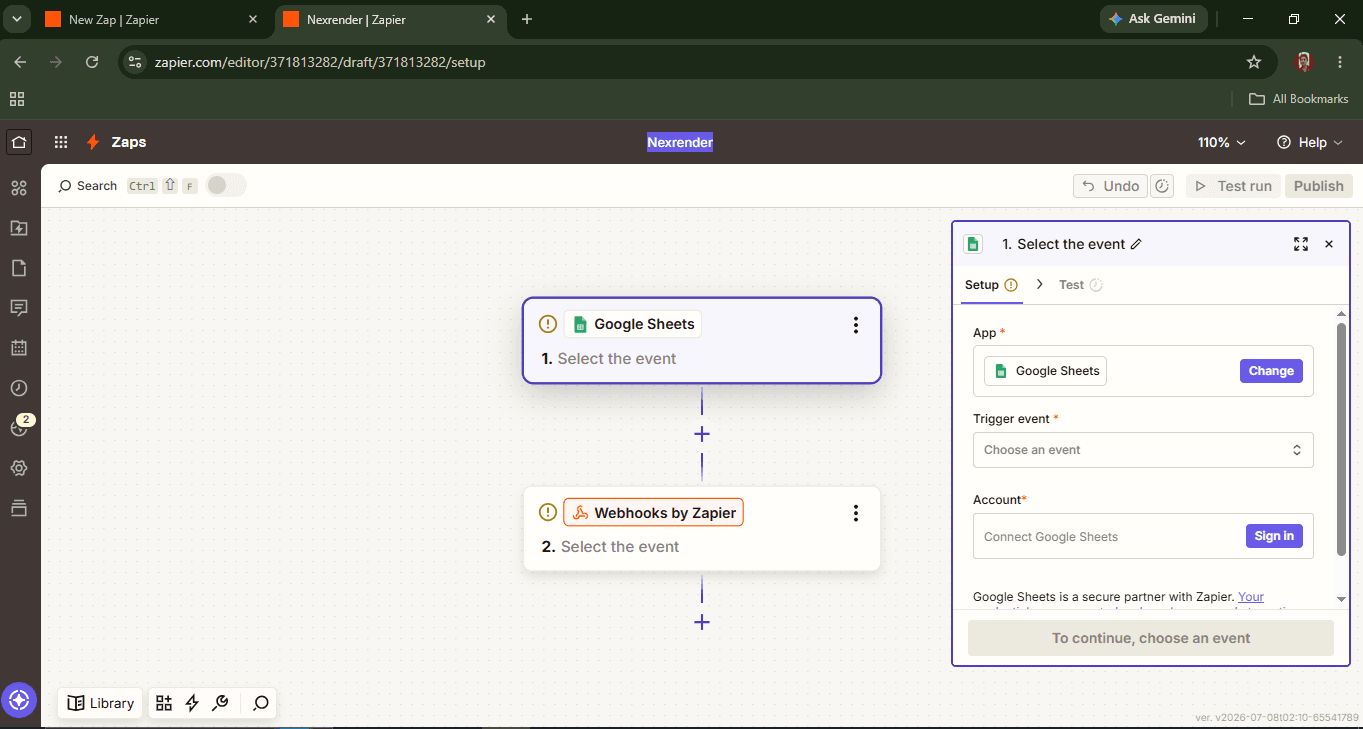
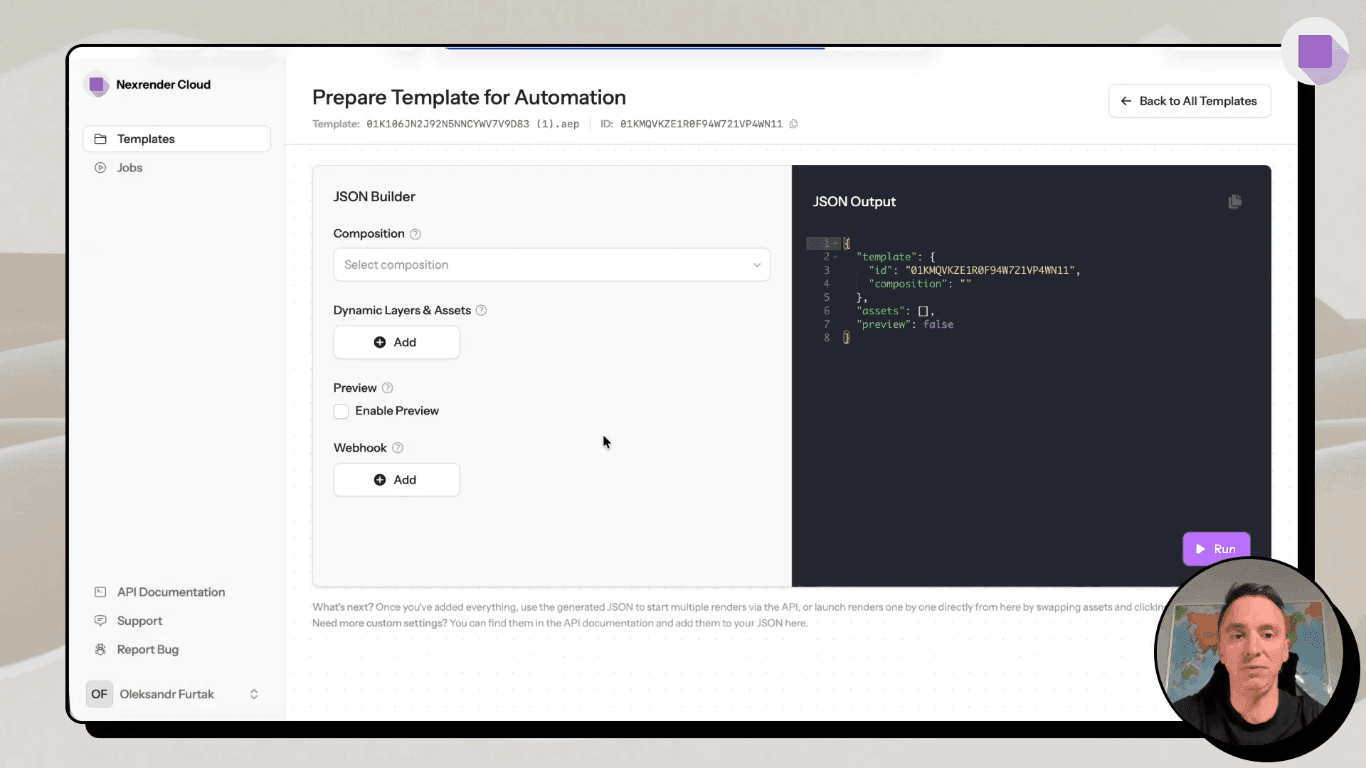
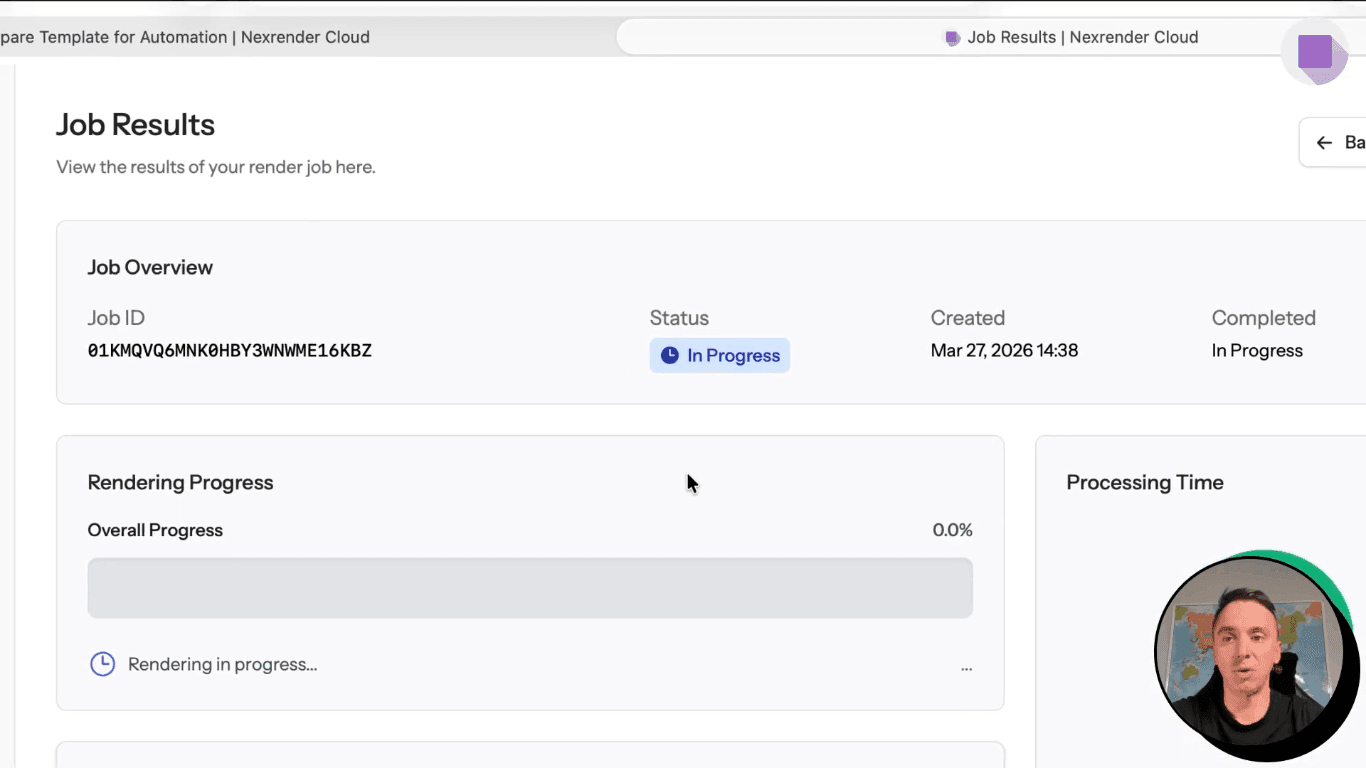
Source: How to start rendering After Effects in Cloud.
What apps can trigger automated video generation?
There are thousands of available apps on the Zapier integrations list, and practically any of them can trigger an automated video rendering.
Here are the top cases marketers, agencies, and developers actually use today:
Google Forms - personalized certificate
As someone completes a class, a workshop, or a webinar and they complete your form, Zapier will now push that name and the date; a video will be produced without any manual steps going into After Effects! Ideal for educational platforms and online schools.
HubSpot - sales follow-up video
A new lead or status change in HubSpot can trigger a short, personalized follow-up video with the customer's name and relevant product information. The video sales approach has significantly higher engagement than a standard email, and this is how it is created without additional work from the sales team.
Shopify - order confirmation video
Instead of a dry email confirmation, the customer receives a short video with order details and product recommendations. This directly affects the shopping experience and can increase trust and repeat purchases.
Airtable - product display
For agencies and teams that manage product catalogs through Airtable, each new line can automatically generate a product video. It is useful for e-commerce brands with a large number of frequently changing items.
Calendly - onboarding video
As soon as users book a call or subscribe for one of your services, you can send them a pre-personalized video with the essential details. This saves hours of the team's time and helps kick off a more productive collaboration.
Google Sheets - mass personalization of videos
One of the most powerful scenarios: a spreadsheet with hundreds or thousands of rows (names, numbers, products) can trigger massive rendering of personalized videos, one row at a time. This is the scenario in which automation "shoots" the most, because manual production of the same amount of video is simply not feasible.
Webhooks - custom apps
For developers and teams with custom solutions, the webhook trigger allows any internal application or system to connect to Zapier, without the need for the application to be natively supported. This opens the door to fully customized Zapier video editing automations.
In all these scenarios, the common thread is the same: data comes from different sources, and Nexrender turns it into a finished video based on a pre-made After Effects template, whether it's one video per day or thousands at once.
Why use Nexrender with Zapier?
When it comes to which render engine to connect to Zapier integrations, Nexrender stands out as a practical and proven solution, primarily because it was designed specifically for Adobe After Effects automation, not as a generic tool where video rendering is only one function.
Automation of After Effects templates
Nexrender takes an existing After Effects project and turns it into a reusable template without having to manually open AE for each new video. Once the template is prepared, the system knows exactly which layers should be changed and how.
API driven rendering
Some may ask: what API options automate video creation? Well, the whole process is triggered via API calls. Zapier sends the data, Nexrender receives it, and starts the render without a single manual action. This is what allows automation to truly work "end-to-end," with no interruptions in the flow.
Dynamic replacement of elements
Text, images, video clips, and even entire compositions can be automatically replaced depending on the data coming from Zapier. This means that the same template can produce hundreds of different video versions, each with different input data.
Generate personalized videos
Thanks to dynamic replacement, the system can automatically create a video with the customer's name, order number, product, or any other detail, without requiring any extra work from the team once the system is set up.
Cloud or self-hosted rendering
Nexrender offers flexibility in where rendering happens. You can use Nexrender Cloud for quick and easy startup without the need for your own infrastructure, or a self-hosted option for teams that need full control over servers and data.
Scalability for thousands of renders
Unlike manual work in After Effects, which has a clear limit on how many videos one person can make per day, Nexrender is designed to handle rendering from a few videos to several thousand at a time. Thus, it is a practical choice for teams working with large amounts of data, such as e-commerce platforms or agencies with mass campaigns.
When we combine Zapier integrations (which recognizes triggers and transmits data) with Nexrender (which turns that data into finished video), we get a complete system that eliminates the biggest obstacle in video production - the time and human labor required for repetitive tasks.
What are the benefits of automating video creation?
Zapier video automation not only influences how video content is produced but also directly affects the time, costs, and results delivered by any team. Key benefits of automating video production process include:
Saving time
What used to take an editor hours (inserting text, replacing images, rendering each version separately) now happens automatically, in the background, while the team attends to other tasks. According to research by SQ Magazine, AI editing tools can reduce production time by 50 to 80%, making automated video generation tools one of the most effective ways to speed up production.
Fewer manual tasks
If the render starts on a trigger (new row added to the spreadsheet, form submitted, order placed), there's no longer a need for someone on the team to manually go into After Effects for each version of the video. The repetitive element of the job has been entirely removed.
Personalized communication with clients
Automation allows each customer to receive a customized video with their name, product, or order details. That significantly changes the communication experience compared to generic content. Almost 90% of marketers claim to have had positive results with personalized videos, citing figures shared by SundaySky based on information by DemandSage.
A consistent brand identity
Since each video is generated from the same template, the colors, fonts, arrangement of elements, and tone remain identical across versions. There is no risk of a video "jumping" out of the brand's visual identity due to human error or haste in hand-crafting.
Greater volume of production
An automated system doesn't differentiate between five and five thousand videos; while manually rendering such a volume would be practically unfeasible, an automated render engine like Nexrender handles a large volume of requests without additional burden on the team.
Better scalability
As the company grows (more clients, more products, more markets), the automated system scales with it, without requiring a proportional increase in the number of people working on video production.
Lower production costs
Less manual labor directly translates to lower costs per video. According to Digital Applied, AI tools have reduced the average cost of video production by 40%, from a median of $4,200 to $2,500 per completed minute of video.
When these benefits are paired with tools like Zapier and Nexrender, moving from manual to automated production stops being just a technical decision; it becomes a direct impact on growth rate and profitability.
What are the best practices for video automation with Zapier?
Most automation gains come from getting it configured properly upfront. Following the recommendations below is critical to ensure a reliable, well-maintained workflow long-term:
Design reusable After Effects templates
If you plan several similar campaigns in the same company, it is better to develop a “super template”, including several possible variations in different ways – divided into layers of text, image, video, and use it then again and again.
Use standardized names for dynamic fields
When the layer names in After Effects are consistent (always client_name, product_image, order_number, not different variants for each project), it's much easier to connect the data from Zapier to the appropriate place in the template, and much less room for error when mapping fields.
Test the workflow before going into production
As a precaution, it might be useful to test it with some data first to make sure that the information goes where it should, that the render starts off OK, and that the video does not come out wrong, before the system starts sending out the automatically generated movie to all customers. A bug found in the test phase is much cheaper than finding it when sending the video to the client.
Track failed Zaps
Zapier notes when an automation step fails. These notifications shouldn't be ignored. Regularly checking the failed Zaps section helps to catch the problem quickly, before a large number of missed renders accumulate.
Optimize rendering performance
Complex After Effects templates with many layers and effects can significantly slow down rendering, especially in mass production. It pays to simplify the composition from time to time, remove unnecessary effects, or check render settings to reduce processing time.
Keep assets centralized
Images, video clips, fonts and other resources used by the template are best kept in one, organized place (e.g. cloud storage), instead of distributed in different locations. This prevents problems with missing files and makes maintenance easier when the asset is changed or updated.
Secure API keys and webhooks
Because Zapier and Nexrender communicate via API calls, keys and webhook URLs must remain secure; not shared publicly, not left in unprotected documents, and rotated regularly as needed. A compromised API key can allow unauthorized rendering or data access.
The next step after recommendations is to select a reliable tool that helps keep everything under control. Nexrender is great for that, as it integrates a template system, renders via API, or manages centralized media assets in a single solution.
Summing up
At a high level, the automation works by taking the business application data that Zapier identifies and sending it to Nexrender to automatically render personalized After Effects videos from standardized templates. There are obvious benefits for businesses of all sizes: save time and money, ensure brand consistency, and allow your production to scale from just a handful to thousands of videos with no increase in team stress. When you understand how the system works, standardize templates, and put security measures in place, you can make automated video generation reliable and automatic.