Year in Review Videos: How to Create Them at Scale
A 'Year in Review' video is a short summary of the year that includes the key results, data, and highlights - in an engaging way. They are used by anyone who wants to keep their audience up to date with what has been accomplished – from brands and ad agencies to HR teams. It's relatively easy to create one of these videos for a single person or organization.
The idea is not simply to make one great recap, but rather to develop a way to consistently generate hundreds of relevant variations. The three elements are: a reused template (that creates the tone and rhythm of each piece), the data (which populates the content, and is unique for each recipient), and the automation (which combines the data and template to create the finished videos). After the initial setup, creating more versions just involves using more data.
Source: Youtube/Screenshot: https://www.youtube.com/watch?v=-Lmyk2oLPQ8
What does a year in review video mean?
A "Year in review" story is a brief visual summary of the year's leading headlines, achievements, milestones, highlights, and results for a specific period. Every story starts with a one-sentence lead that establishes the timeframe and/or range of the story (such as Your 2026 and The Year in Numbers). It's followed by a storyline of milestones, facts, and numbers that include details like graphics, context, photos, video footage, animated text. At the end, there is a conclusion that looks ahead or thanks the audience and thus closes the story.
However, this varies based on who you're talking to and what the video is trying to accomplish. A recap video to customers tends to be more geared toward results and what your customer did. For example, the number of orders, amounts saved, or features used. A recap video to employees or the company will focus more on accomplishments of the team, who has been added, and what goals have been met. A marketing recap will focus on awareness, interaction, and conversion, while social media is highly visual with a simple, quick, exciting, visual binge and easily shareable format. So before selecting the data and visuals, start by answering two questions: Who are you talking to? What do you want them to feel or do after the video?
How do I do a year in review video at scale?
The most savings happen when design is held separate from content. Instead of designing each recap as a new item, the team drafts up one template: scene arrangement, font selection, palette, animation, and pacing. All variations (recipient names, numbers, photos, clips) go into the template as variable values, so the final product becomes two layers: one designed one time and the other updated for each version.
With manual rendering, the team opens the same project file for each of the videos, where a video editor has to enter the text, switch images, and wait for the export to complete. The duration is linear with respect to the number of versions, and so is the proportion of effort that a human has to put in, and the chance that something will go wrong. With an automated pipeline, the data gets assembled into a spreadsheet (or a JSON file), for the automation engine to insert into the template, and then renders this in batches, once again without involving the human in the construction of individual videos. So human effort in the making of the template and data quality control gets you both 50 versions or 5,000 versions.
| Production approach | How it works | Best suited for | Main limitation |
| Manual editing | Each video is edited individually | One-off or highly bespoke recaps | Repeated work increases with every version |
| Template-based production | A reusable design is adapted for each recap | Small batches with consistent branding | Updates may still require manual effort. |
| API-driven automation | Data and assets populate templates, and jobs are rendered programmatically | Large batches of personalized videos | Requires initial setup, testing, and workflow maintenance |
Which option should you choose? There is no standard recipe. There is a factor of how many videos you need to deliver, how detailed you want the personalization to be (from a few numbers and a name to a completely different scene), how complex the design is, how much animation is involved, and, finally, the technical tools at your disposal. For just a few videos with only subtle variations, manual production could be quite manageable. But as the number of versions increases - and the amount of data that you are using to change the content - a pipeline begins to make sense.
So the decision must be made not in relation to what is currently popular, but in relation to the actual possibilities of the project. The team that does not have developers is more suitable for the visual tool. On the other hand, the team with developers can build a more flexible flow around the APIs and their data. Before making a decision, it is worth testing the workflow on a smaller sample because you will immediately see what does not work and only then rely on a larger volume.
Professional tip:
If your team is already making templates in Adobe After Effects, then Nexrender is the obvious video production automation software: it fills those templates with data and renders a video for you, defined by a job in a JSON file. It integrates well into any workflow and the same template can be used across all the versions of the recap.
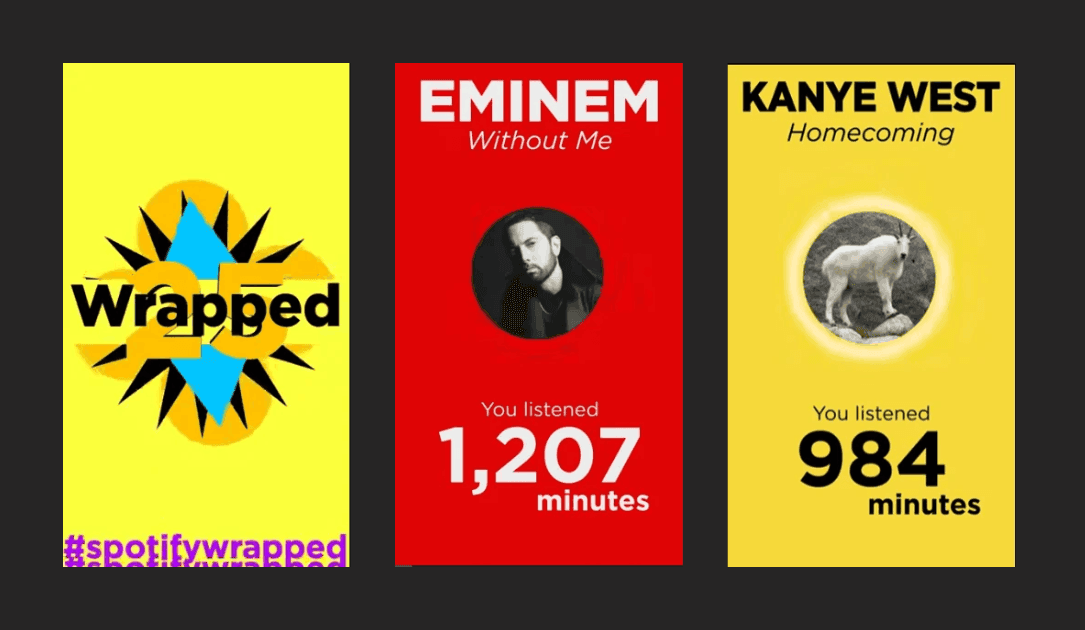
Source: Youtube/Screenshot: https://www.youtube.com/shorts/XzUzBkIwH4E
How to personalize a year in review videos using data?
Personalization is based on a straightforward principle: if a field in a template differs for each recipient, it's a variable, and the content should be proofed. Rather than editing text and images for every video, the team makes certain elements of their video template replaceable. For these placeholders, a data file (like a spreadsheet, CSV, or JSON file) decides what content will be added for each individual video. The media file stays the same; only the dynamic part changes in each version.
You can also add more complexity. The simplest examples are the most straightforward: names, dates, and account details. For example, "Your 2026" with the customer name and the date they signed up. You can also go more detailed with individual pieces of information and more specific milestones or activity summaries, like projects completed, most-accessed features, activities performed, or goals achieved. For businesses, this also includes client-specific or campaign-specific metrics such as reach, engagement, or conversion rate. And even at a visual level, the icons, product displays, logos, and close-up images can all be customized to each segment or even individual recipient.
Imagine you have a SaaS company and want to reach out to all of your clients with a yearly summary. You have designed a template with 5 scenes: an opening screen that contains the client's name and logo, the slider with important metrics, a slide dedicated to the achievements made during the year, a scene with the product in use, and an ending slide with a "thank you" message. You create a spreadsheet where each row contains the client information, and each column contains one of the fields of your template: name, path to the logo, number of projects completed, one achievement, and one message. Your team generates a video for each row by rendering this spreadsheet automatically, so you never need to open a project file to generate a video anymore.
But it shouldn't stop there. Automation may save production time but doesn't ensure accuracy. A template will show bad data no less than it will show good data. This means the data should be validated: ensuring that no text fields are blank, the numbers aren't outside expected parameters, the names are correct, and a long name doesn't cause the text to overflow the frame. Ideally, you should test your template with some real data and some data at the extreme ends; for example, some of the longest possible names, some of the highest/lowest numbers, and possibly some images that are missing.
Keep in mind that privacy and usage rights need to be considered. A personal or business record can be used if there are appropriate lawful grounds for the use and use rights have been approved. Pay special attention to what data appears in any video that is broadcast or shared. The same applies to other assets: logos, photos, music, and videos must be designated for each context in which they might be used. In the end, human review is a part of the process. Even when hundreds of versions are produced, a sample is verified (and with sensitive recaps, more than a sample), because this typo in a name or number does not escape the reader.

Source: Youtube/screenshot: https://www.youtube.com/watch?v=e1DDHqJURk4
How to prepare After Effects templates for automated video production?
After Effects is a great year-in-review video maker, but keep in mind that automation is only as good as the template. Check the following points before connecting it to the data.
- Divide the fixed elements from the variable ones. Branding and animation (logo, colors, fonts, rhythm) are fixed, and only the variable content is inserted into editable fields. If you know which texts, images, and video elements are replaceable, that will help you keep them separated from everything else in the composition.
- Remember uniform naming of layers and compositions. As fields will be found by their names, it is necessary to consistently name the layers in the projects using the same labels "name," "metric1," or "closing_message."
- Test whatever you want. Use some short values, some long ones, some empty fields, some things you'd never expect to put in, like a really long name, a zero when you'd normally put a number, an image with odd proportions.
- Ensure technical data is correct - check your fonts, external media (such as video or music) files used in the project, scene length, and output settings.
When the template is completed, you need a tool to fill it with data and produce it. And that's where Nexrender helps: it's compatible with After Effects projects, it handles the content replacements based on a JSON job, and it offers a dashboard and an API for controlling the rendering.
How to export and distribute year in review videos efficiently?
Delivery is already half the job by determining where the video will be watched; only then should you consider the export process. Before beginning a batch, check the following:
- Choose the aspect ratio and resolution depending on the target platform. Vertical (9:16) is preferable for Stories and short video content on social media. Square (1:1) and horizontal (16:9) formats are suitable for feeds, email, and presentations. Select the resolution based on your end goal. High file sizes don't mean high quality; on a mobile phone, it won't look any better.
- Select the correct format and compression. The most widely used is MP4 with the H.264 codec. Compression should be such that there is a balance between quality and size, particularly if you plan to share the video through email or a link.
- Look over the final video. Pay attention to all details: audio, captioning, text readability for smaller screens, brand consistency, correct data. Numbers or names that are wrong may not be visible in the template but could still be wrong in the final output.
- Maintain a list of jobs that don't work. When you output bulk files, a number may break due to faulty data, missing files, or bugs. Make a list of the broken ones and output only them to speed things up.
- Prepare the delivered files and check them thoroughly. Systematically naming the completed files (by client or ID) and a logical folder structure will assist in preventing a duplicate of the incorrect version of a file from reaching the incorrect person. It is also recommended that you double-check that the appropriate video is sent to the person.
Job automation and cloud rendering can help if you're running large batches, as each video is its own job that can be monitored, remade, or downloaded. Performance will also vary based on project complexity and infrastructure/production goals, so we recommend trying out a small batch first and testing in your environment.
What should I check before publishing a year in review video?
- Content accuracy: cross-check the numbers, dates, and achievements displayed against the source data (sample) and verify the correctness of name spellings (diacritics, upper/lower case characters, abbreviations).
- Media rights: Confirm that all images, logos, music, and fonts are used or owned by the license holder and are licensed for this purpose.
- User-specific examples: choose random examples and edge cases (e.g. The longest name, missing fields, or a zero instead of a number) so that you can confirm that all the videos are being posted for the right person.
- Playback: Play the full video on a mobile device and a desktop computer to check for audio dropouts, mismatched captions, freezes or black frames, and text overlays.
- Platform technical requirements: Make sure the aspect ratio, resolution, file format, file size, and duration match the platform's requirements for the video's destination.
Summary
Create an engaging Year in Review video with a clear narrative, metrics, and graphics crafted for your audience. Hundreds of variations, templated components, color-coded data, and automated rendering can offer a replicable process-but creative leadership and quality checks are essential.